
Key Takeaways
- Manufacturing sales runs on specifications, quantities, negotiated prices, WhatsApp conversations and credit terms, not just email and deal stages.
- For a manufacturer, a deal is not finished at “closed won”. The order must be correct in the ERP.
- Eight capabilities matter most: capture, conversation, enquiry details, follow-up, onboarding, credit, agreed terms and the order.
- You usually do not need to replace your CRM or ERP. What is often missing is the intelligence between them.
- Test any tool with one of your own real deals, not a demo script.
If you run sales for a manufacturing business, this may sound familiar. This guide explains the gaps to check and what your sales software needs to do instead.
Why Generic CRMs Can Fall Short In Manufacturing Sales
A CRM configured around email outreach, product demos and subscription contracts may leave manufacturing work manual. Manufacturing sales involves specifications, dealers, negotiated prices, customer documents, credit terms and an ERP order.
The difference is clearest side by side.
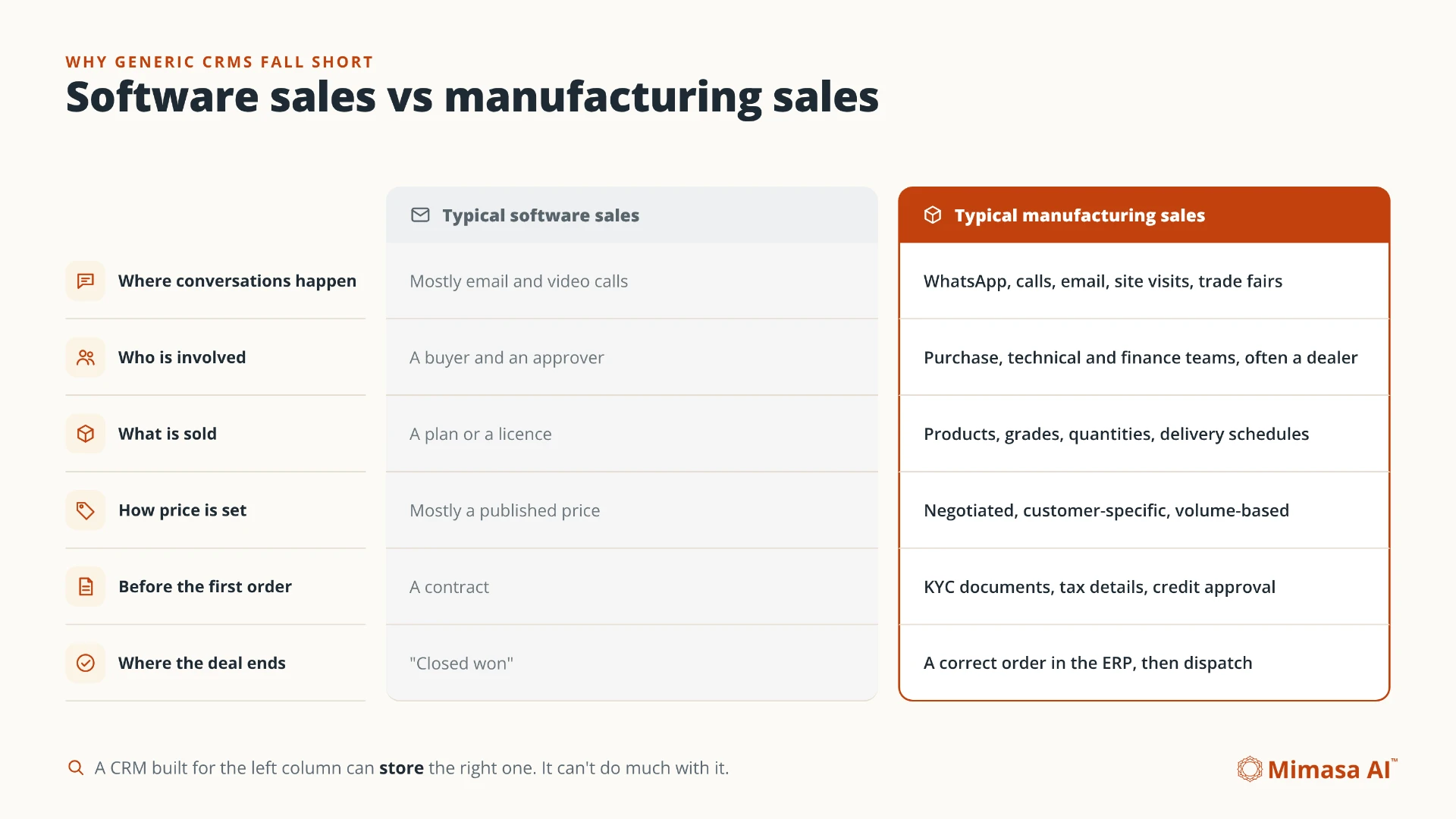
- Conversations
- Software sales: mostly email and video calls. Manufacturing: WhatsApp, calls, email, site visits and trade fairs.
- People
- Software sales: a buyer and approver. Manufacturing: purchase, technical and finance teams, often with a dealer.
- Product And Price
- Software sales: a plan or licence, often with published pricing. Manufacturing: products, grades, quantities and negotiated prices.
- Before The Order
- Software sales: a contract. Manufacturing: customer documents, tax details and credit approval.
- Finish Line
- Software sales: “closed won”. Manufacturing: a correct order in the ERP, then dispatch.
A CRM can store these details, but recording them does not automatically complete the next step. The work may still fall to salespeople, coordinators and finance staff.
Not every CRM has the same limits. Industry-specific systems can support sales agreements and ERP-linked order information. Evaluate your configuration, rather than assuming every CRM is email-only. [1]
What Should Sales Software For Manufacturing Actually Do?
Look for eight capabilities: capture leads, understand conversations, record enquiry details, follow up with context, onboard customers, support credit checks, lock terms and create ERP orders.
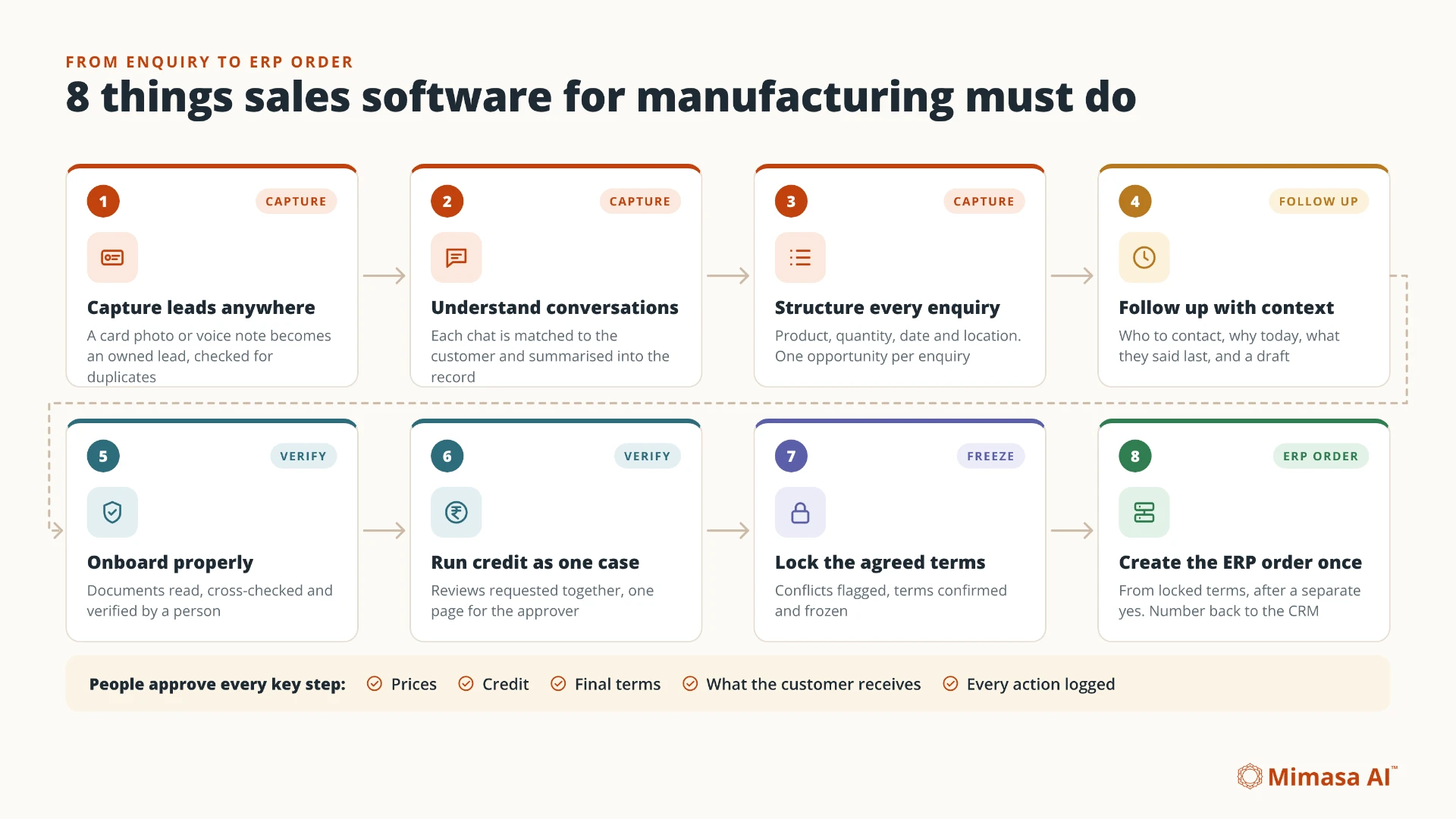
- 1
Capture Leads Where They Actually Happen
Manufacturing leads arrive as visiting cards at trade fairs, voice notes from the field, WhatsApp messages and website enquiries. Software that only captures web forms misses many of them.
What Good Looks Like
A photo of a card or a short voice note becomes a lead, with one owner and a check that the buyer is not already in the system.
Ask The Vendor
“Can my salesperson photograph a visiting card and get a lead, with a duplicate check?”
- 2
Understand Conversations, Not Just Store Them
Logging a chat is not the same as understanding it. The price discussed, the quantity requested and the date promised all sit inside the conversation.
What Good Looks Like
Every conversation is matched to the right customer and summarised into the record. Anyone can see what was asked, offered and still open.
Ask The Vendor
“If I give you a WhatsApp thread, can the system tell me what the customer asked for and what we promised?”
- 3
Capture Enquiry Details Properly
A manufacturing enquiry is not “interested in the product”. It is a product, a quantity, a delivery date and a delivery location, often with a grade or specification.
What Good Looks Like
Each enquiry captures these details in a structured way. Each separate enquiry becomes its own opportunity, so two requirements from the same customer never get mixed up.
Ask The Vendor
“When an existing customer sends a new enquiry, is it linked to their account and salesperson, and kept separate from their other deals?”
- 4
Follow Up With Context, Not Just Reminders
A reminder that says “Follow up with ABC Industries” does not help much. The salesperson still has to search through chats to remember why.
What Good Looks Like
Each morning, every salesperson sees who to contact, why it is due today, what the buyer said last, and a draft to edit before sending.
Ask The Vendor
“What exactly does my salesperson see when a follow-up is due?”
- 5
Onboard New Customers Properly
Before a first order, manufacturers commonly collect a GST certificate, PAN, bank details and an address proof. These tend to arrive in pieces, on different channels. The exact document list follows your business and credit policy.
What Good Looks Like
Documents are read as they arrive and shown beside the original for a person to verify. Details are cross-checked, and only verified information is saved. For example, check the PAN within the GSTIN against the business PAN.
Ask The Vendor
“Where do customer documents go, and how are mismatches caught?”
For ordinary PAN-based registration, GSTIN characters 3 to 12 contain the PAN. CBIC describes the identifier’s structure in registration Rule 10. [1]
- 6
Make Credit Checks Part Of The Sale
Credit approval can involve several views: compliance, market feedback and the customer’s payment behaviour. When these run one after another over email, the customer waits.
What Good Looks Like
One credit case per customer, with each review requested at the same time. Late replies get reminders, and the approver sees everything on one page before deciding.
Ask The Vendor
“Can our credit approver see every review for a customer in one place, without searching through emails?”
- 7
Lock The Agreed Terms Before The Order
Final prices, payment terms and delivery dates are often settled across several messages. If they are not confirmed in one place, the order can go out wrong.
What Good Looks Like
A deal summary built from the conversation, with any conflicts flagged, confirmed by an authorised person and then locked.
Ask The Vendor
“If the chat says 45-day credit and the proposal says 30 days, will the system notice?”
- 8
Create The Order In The ERP, Once
This is where many sales tools stop. The deal is marked “won”, and someone retypes the order into the ERP.
What Good Looks Like
After a separate approval, the order is created from the locked terms, with a check that it does not already exist. The order number returns to the sales record. A missing ERP customer code is caught before order creation.
Ask The Vendor
“After the deal is confirmed, who creates the ERP order, and what stops it being created twice?”
Also Non-Negotiable: Approvals And An Audit Trail
Whatever the software automates, people should approve what matters: prices, credit, final terms and what the customer receives. Every action should record who approved what, and when.
Where WhatsApp requires approved message templates, the software should respect them. Templates are required outside an open customer service window on the WhatsApp Business Platform. [1]
CRM, ERP And The Work In Between
In manufacturing, the CRM keeps track of customers and deals. The ERP runs orders, invoices and dispatch. Conversations, documents, credit and agreed terms sit between them, where much of the manual effort remains.
Think of it as three layers.
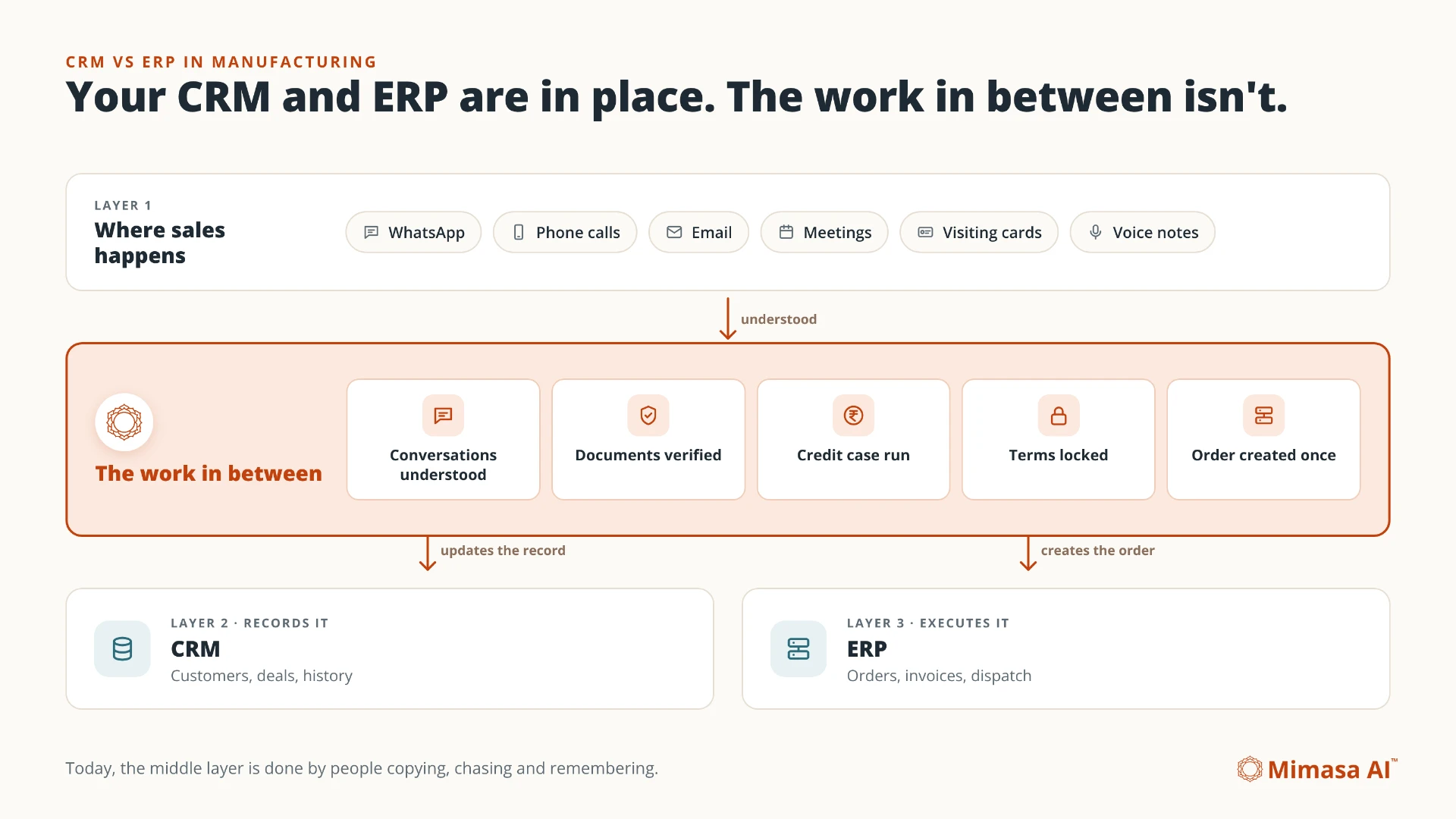
- Where Sales Happens
- WhatsApp, calls, email, meetings, visiting cards and voice notes.
- What Records It
- Your CRM: customers, deals and history.
- What Executes It
- Your ERP: orders, invoices and dispatch.
Many manufacturers already have the second and third layers. What is missing may be something that understands the first and carries the deal through to the third.
Today, people do that job by copying, chasing and remembering. The right addition may be an intelligence layer around your CRM and ERP, rather than a replacement.
Manufacturing CRM Features Versus What You Actually Need
Common manufacturing CRM features are useful. On their own, they do not prove that the full journey is covered. Check what happens between each stage.
- Contact management
- The Gap: Stores people, not what was discussed
- Look For: Conversations understood and summarised
- Sales pipeline
- The Gap: Shows the stages someone remembered to update
- Look For: Records kept current from the actual work
- Email campaigns
- The Gap: Some manufacturers’ buyers prefer WhatsApp
- Look For: WhatsApp handled properly, with approval
- Follow-up reminders
- The Gap: Says when, not why
- Look For: A daily list with the reason and a draft
- Mobile app
- The Gap: Can still rely on typing
- Look For: Capture by photo and voice note
- ERP integration
- The Gap: Depends on a correct order being ready
- Look For: An order built from confirmed terms, created once
- Reports and dashboards
- The Gap: Only as good as what was entered
- Look For: Questions answered from records and conversations
How To Evaluate Sales Software For Your Manufacturing Business
The most reliable test is to run one of your recent deals through the software, from the first message to the ERP order. Use anonymised copies of documents and conversations, shared with permission.
Demos built on clean sample data can hide the gaps that matter most. Bring these five things instead.
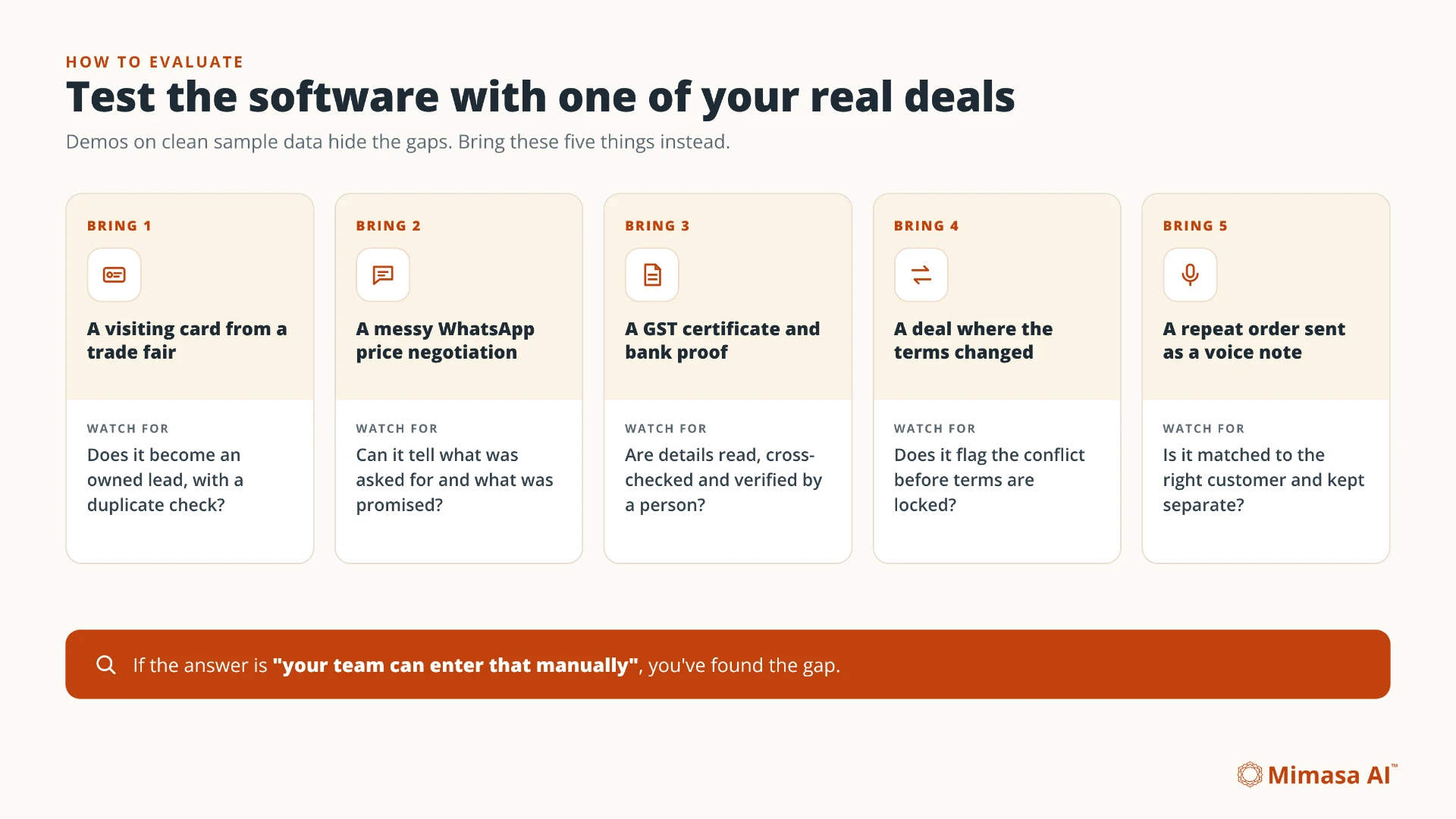
1. A Visiting Card From A Trade Fair
Does it become an owned lead, with a duplicate check?
2. A Messy WhatsApp Price Negotiation
Can it tell what was asked for and what was promised?
3. A GST Certificate And Bank Proof
Are details read, cross-checked and verified by a person?
4. A Deal Where The Terms Changed
Does it flag the conflict before terms are locked?
5. A Repeat Order Sent As A Voice Note
Is it matched to the right customer and kept separate?
If the answer is “your team can enter that manually”, you have found the gap.
Common Mistakes Manufacturers Make When Choosing Sales Software
- Choosing By Feature Count
- A long feature list does not mean the hard steps are covered.
- Replacing Systems That Work
- Swapping a working CRM or ERP creates a migration project and may leave the gaps between them unchanged.
- Ignoring WhatsApp
- If customers and dealers prefer WhatsApp, software that cannot handle it will be bypassed.
- Asking Salespeople To Type More
- Every extra field adds admin for the people who should be selling.
- Stopping At “Closed Won”
- For a manufacturer, the deal is not done until the order is correct in the ERP.
How Mimasa AI Works For Manufacturing Sales
Mimasa AI is an Agentic AI platform for enterprise automation, intelligence and operational execution. For manufacturing sales, it connects the work from the first enquiry to a confirmed ERP order.
It works around your existing CRM and ERP, using configured connections for messages, voice notes, email and documents. People stay in charge of key decisions.
- Capture From Anywhere
- Visiting cards and voice notes become owned leads, checked for duplicates. Website and WhatsApp enquiries use approved information and become leads after regional approval.
- Conversations Understood
- Chats and emails are summarised into the CRM. Customers stay on WhatsApp and email, while your team works in Gosthi. Internal notes stay internal.
- Structured Enquiries
- Product, quantity, delivery date and location are captured. Each enquiry becomes its own opportunity, matched to the customer and their salesperson.
- Follow-Up With Context
- A daily list for every salesperson, with the reason and a draft to approve.
- Onboarding And Credit As One Case
- People verify document details. Compliance, market research and credit monitoring are requested together, tracked and shown on one page for the approver.
- Locked Terms
- A deal summary flags conflicts, then an authorised person confirms and freezes the terms.
- One ERP Order
- The configured workflow creates an order from agreed terms after separate approval, checks the ERP customer code and returns the order number to CRM and Gosthi.
- Your Systems Stay
- CRM and ERP remain the systems of record. Connections and approval rules are configured during setup. Deployment can use cloud, private cloud or on-premise options.
The workflow suits manufacturers and related industries where deals involve documents, credit and an ERP order. Examples include chemicals, pharma, agrochemicals, construction, electrical and building materials.
Confirm supported connections, document quality and approval rules during setup. Ambiguous messages, missing documents or conflicting terms need review, not a guessed order.
Bring Your Messiest Deal
Show us a WhatsApp thread, customer onboarding and your ERP process. Map the path from first message to confirmed order.
Where To Start
Start small and prove it. Choose one measurable process before connecting the entire sales journey.
- 1
Pick one sales team and one product line.
- 2
Walk one recent deal from enquiry to ERP order. Note every point where someone retyped, chased or remembered something.
- 3
Begin with lead capture and follow-up, where the change is felt quickly.
- 4
Then connect onboarding, credit, agreed terms and the ERP order.
- 5
Expand to more teams once the first flow is working and trusted.