

A CRM can contain every lead and still leave the team unsure where to start each morning. The reminder says “Call the buyer.” The salesperson still has to search for the last email, check WhatsApp, remember an open promise and decide whether today is the right day.
The gap is not always storage. It is the work between a reminder and a useful next step. A lead follow-up system connects that work without replacing the CRM that holds the record.
What Is A Lead Follow-Up System?
A lead follow-up system is the set of records, rules and daily routines that helps each lead receive the right follow-up from the right person. It answers three questions for every salesperson: who needs attention today, why, and what should happen next?
Every working system needs four parts: one record and one owner, clear follow-up rules, conversation context, and a daily list. Without an owner, work gets missed. Without context, follow-ups become generic. Without a list, the work stays buried in separate tools.
One Record, One Owner
A clear place for the lead and the person responsible.
Written Rules
When to follow up, what takes priority and when to stop.
Connected Context
Available email, WhatsApp, call notes and CRM activity.
A Daily List
Who is due, why today and what action is ready for review.
Why CRM Follow-Up Reminders Alone Often Fall Short
A reminder can tell a salesperson who is due without showing why or what changed. The person opens the record, searches for the last conversation and rebuilds the story before writing a reply.
That extra work is easy to postpone. The reminder pile grows, while a buyer's question or agreed date stays in a different place.
Shows who is due
CRM Reminder: Yes
Lead Follow-Up System: Yes
Explains why today
CRM Reminder: Usually no
Lead Follow-Up System: A reason for each lead
Shows the latest conversation
CRM Reminder: Only when someone logged it
Lead Follow-Up System: Connected history with source links
Pauses when the buyer replies
CRM Reminder: Not by itself
Lead Follow-Up System: Yes, when the reply is available to the workflow
Prepares what to say
CRM Reminder: No
Lead Follow-Up System: A draft for a person to review
Reminders are useful. The system around them helps the team move from a due date to an informed action.
How To Build A Lead Follow-Up System In 6 Steps
Build the foundation in order. Each step makes the next one possible.
- 1
Give Every Lead One Record And One Owner
Capture every enquiry in the same place, whether it arrives through a form, business card or WhatsApp. Check for an existing record before creating another. Assign one person when the lead enters the system, not after it has sat in a shared inbox.
Start with the intake fields your team actually uses, then define how duplicates and ownership changes are handled.
- 2
Write The Follow-Up Rules Before Automating
Rules set when a lead is due and when contact must stop. The buyer's date comes first. If they asked a question, answer it before sending a reminder. If your team owes a document, deliver it before asking for an update.
For a proposal with no agreed date, choose a team rhythm for that stage. Stop on a clear no or a request to opt out.
- 3
Bring The Conversation Into The Lead Record
A useful follow-up depends on what the buyer last said, what your team promised and what remains open. Bring permitted email, WhatsApp, call notes and CRM activity together, while keeping source messages available for checking.
Make gaps visible. Old syncs, missing channels and conflicting notes should not look like complete history.
- 4
Replace The Reminder Pile With A Daily List
Each salesperson needs a short list of leads due today, with a reason for each one. A list entry should show the owner, stage, latest conversation, open commitments, draft status and source links.
Deliver it where the team already starts the day, such as an inbox or team workspace. Separate paused leads from drafts ready for review.
- 5
Draft From Context And Keep Approval With A Person
A draft should connect what the buyer said, what your team promised and the next useful step. It should not invent a price, date or commitment. If a key fact is missing, flag the gap for the salesperson.
Let a person edit, approve, skip or reschedule each message. Batch review can save time, but every prospect still gets a separate, relevant message.
- 6
Pause On Replies And Review The Rules Weekly
A reply on one channel must pause an outdated follow-up on another. Record the send result, set the next date and keep failures visible. Review what was due, sent, edited, paused and answered each week.
Adjust the rules when the workflow misses context. Do not treat the first setup as a set-and-forget process.
Write The Follow-Up Rules Before Automating
Rules decide when a lead is due and when the next contact should stop. Write them down before configuring software. A hot enquiry and a long-cycle tender should not share one fixed schedule.
The buyer gave a date
Team Rule: Follow up on that date, not before.
The buyer asked a question
Team Rule: Answer the question before sending a reminder.
Your team owes information
Team Rule: Deliver the promised item before asking for an update.
A proposal has no agreed date
Team Rule: Use the team's agreed rhythm for that sales stage.
There have been several unanswered touches
Team Rule: Send one polite close-the-loop note, then pause.
The buyer asked you to stop
Team Rule: Stop outreach on every connected channel and record the request.
A Daily List Should Make The Next Action Clear
Each line should help someone act without opening five other tabs. Include the prospect and owner, reason due, latest conversation, open questions or promises, draft status and links back to the source. The salesperson can then edit, approve, skip or reschedule with the facts nearby.
Illustrative Example · Fictional Lead
A buyer asked for revised specifications before an internal review. The daily list shows that the specifications are still owed, links to the request and keeps the reminder paused until the salesperson sends the promised file.
How The Follow-Up Loop Works
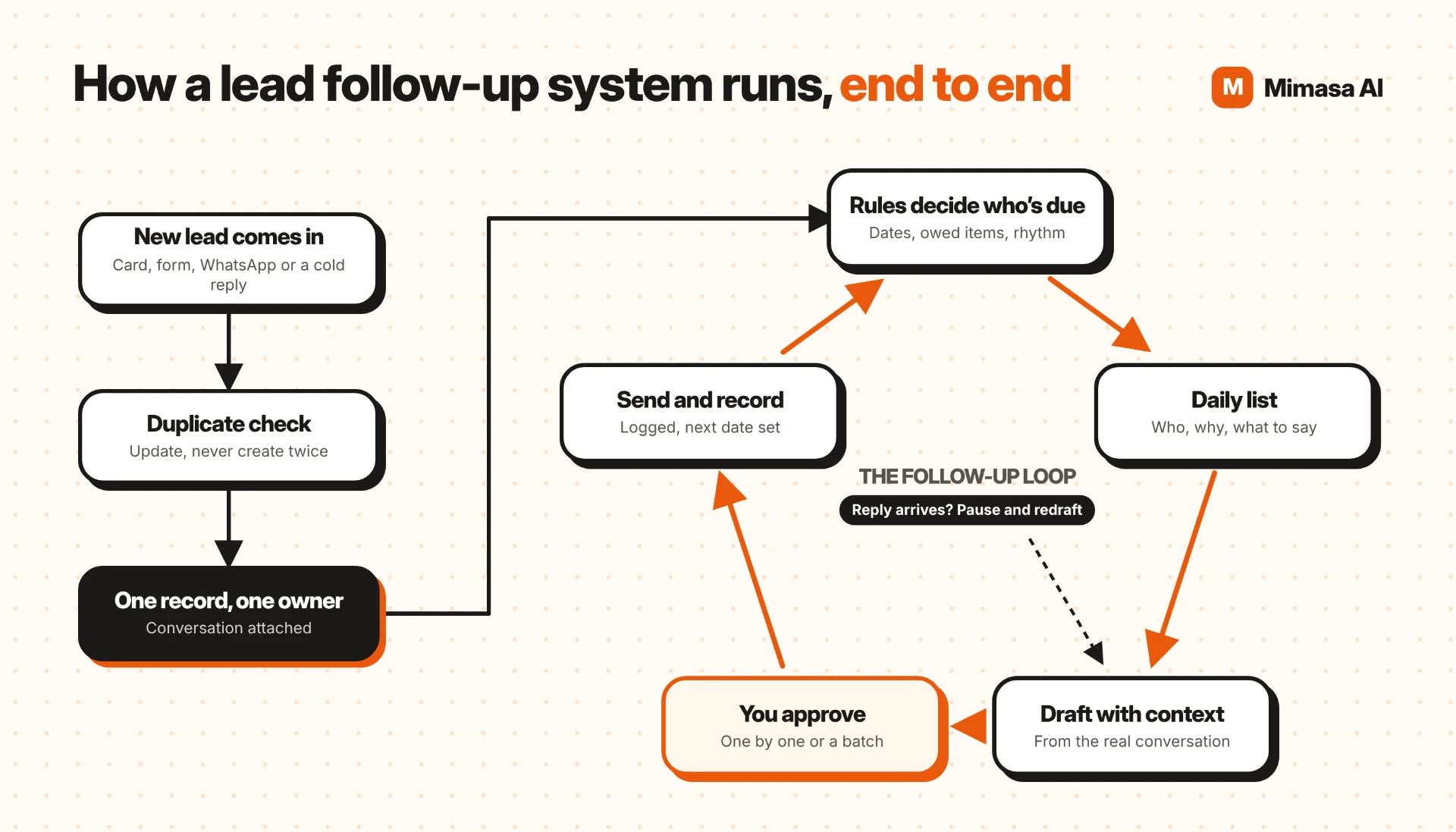
Once the six steps are in place, the same loop can run across leads. New records are checked for duplicates and assigned an owner. Rules decide when a lead is due. A list brings the lead to the salesperson with context and a draft. A person approves the message, and the system records the result and next date.
If the buyer replies, the queued follow-up pauses and the next draft uses the new conversation. This is how a workflow connects information to action while keeping a person responsible for what gets sent.
Spreadsheet Vs CRM Vs A Follow-Up System
Teams do not need to jump straight to a complex setup. The right stage depends on the number of active leads, channels and people involved.
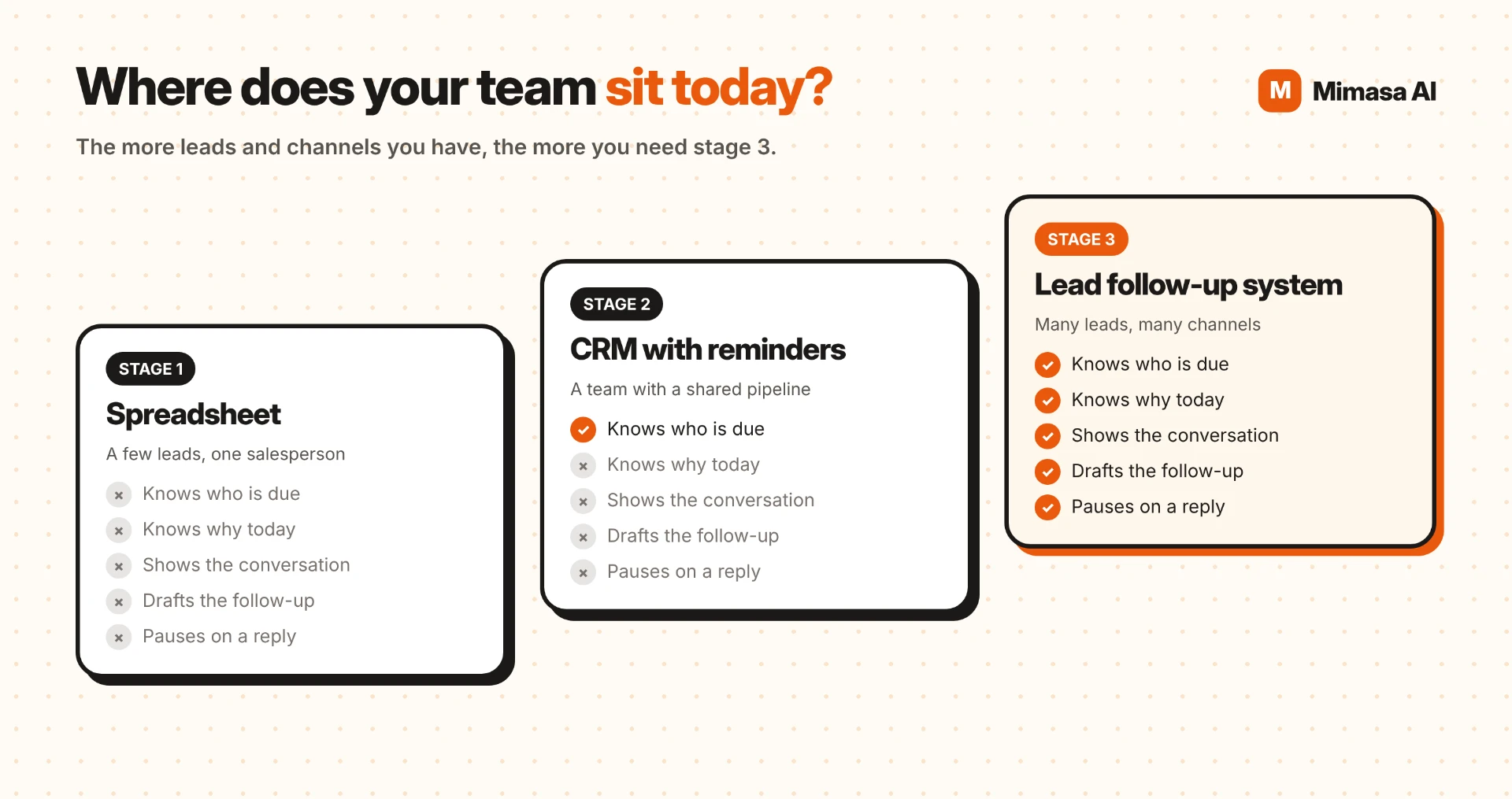
Spreadsheet
Works For: A few leads managed by one salesperson
What It Provides: Someone updates it by hand
When It Fits: A single owner can keep it current
CRM with reminders
Works For: A shared pipeline with assigned tasks
What It Provides: Tasks show who is due, but context may live elsewhere
When It Fits: The CRM stays the lead system of record
Lead follow-up system
Works For: Many active leads and connected channels
What It Provides: Rules, recent context, a daily list and a reviewed draft
When It Fits: Useful when context gathering is slowing the team
A spreadsheet can work when one person handles a small list. A CRM helps a team share pipeline records and tasks. Lead follow-up software becomes useful when the team spends more time finding context than acting on it.
Software should support the process your team has agreed to. Start with your CRM, the available channels and the point where manual handoffs currently break down.
One System For Cold Leads And Existing Leads
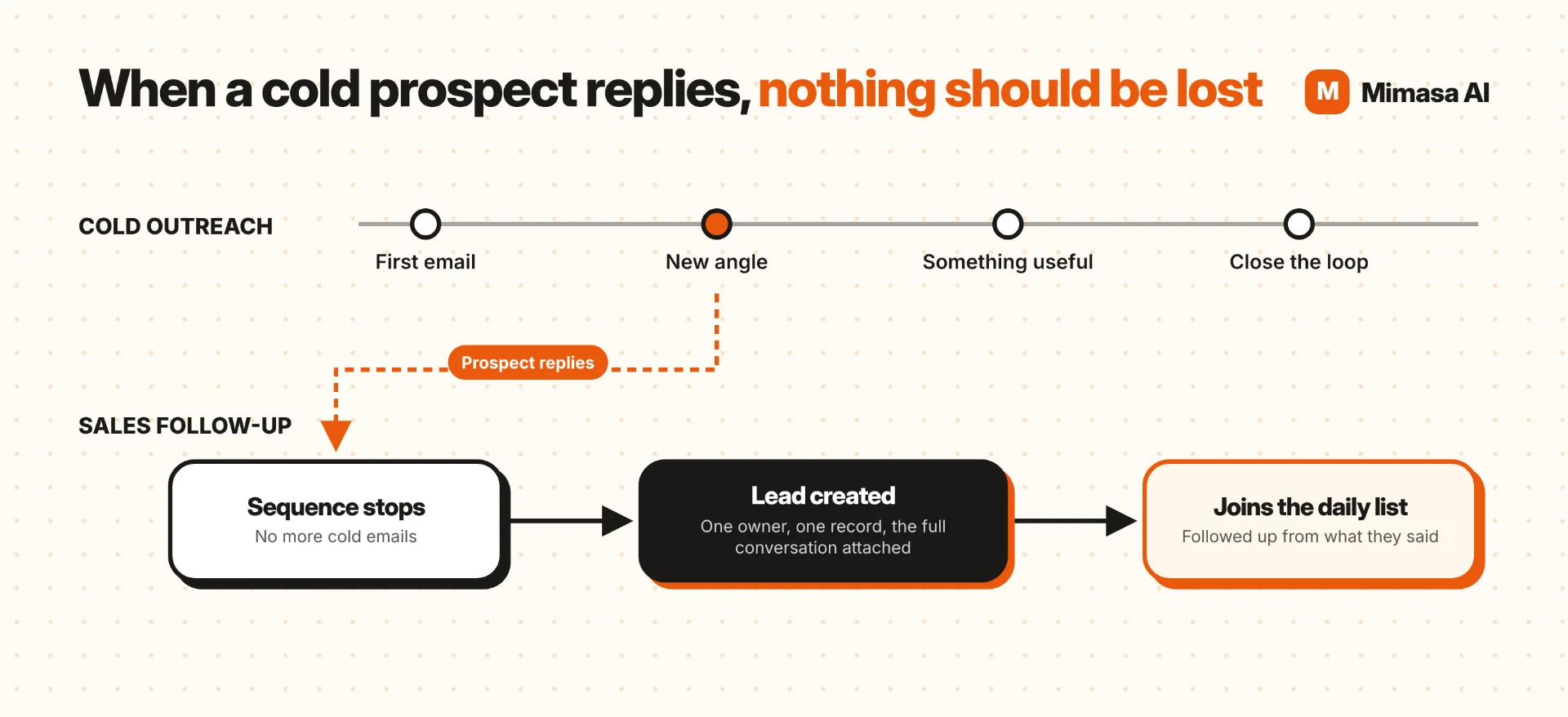
Cold outreach and sales follow-up have different jobs. A cold sequence tries to earn a first reply. Sales follow-up moves an existing conversation forward. When a prospect replies, the sequence should stop and the new lead should get an owner, a record and the conversation that started the relationship.
That handover is easy to miss when the reply stays in one person's inbox. A clear process moves the reply into the CRM and includes the lead in the owner's daily list.
What To Measure In The First 30 Days
Start with one team or lead segment and record a baseline. Measure whether the process is being followed before setting targets. Count each confirmed sent message once, even if it appears in both email and the CRM. Keep drafts separate from sends.
Due follow-ups completed on time
Why It Matters: Shows whether the list and rules fit the team's routine.
Time spent finding context
Why It Matters: Tracks the work before a salesperson can write a useful reply.
Drafts approved, edited or skipped
Why It Matters: Frequent edits can point to missing context or weak rules.
Follow-ups paused after a reply
Why It Matters: Makes visible when the workflow prevented an outdated message.
Replies and agreed next steps
Why It Matters: Compare with your own starting baseline, not an outside benchmark.
Five Mistakes That Break The System
- 1.
Automating before rules exist. The workflow repeats confusion faster.
- 2.
Leaving leads without one owner. A shared inbox is not an assignment.
- 3.
Ignoring a channel buyers use. A reply on WhatsApp should count as a reply when the channel is connected.
- 4.
Sending without human review. A person's name and relationship sit behind every sales message.
- 5.
Never reviewing the rules. A weekly check during the first month helps surface missed dates and weak drafts.
How Mimasa AI Fits The Follow-Up Workflow
Mimasa AI can connect permitted CRM, email and WhatsApp context into a daily list, prepare follow-up drafts and wait for a salesperson's approval. The CRM remains the system of record. Available history and actions depend on the connections and permissions configured for the workflow.
Lead automation can capture new enquiries, while CRM workflow automation connects follow-up tasks with the broader sales process. For the process details, see Mimasa AI's lead follow-up automation workflow. For the wider sales journey, explore Sales Automation.
The Short Version
A lead follow-up system is not a bigger CRM. It is one owner per lead, clear rules, the conversation in reach and a daily list that explains who needs attention and why.
Build the loop around the team's real process. Keep a person on the send decision, make replies stop stale messages, and use the first month to improve the rules. Sales automation should help the human workforce remember and coordinate, while people remain responsible for the relationship.