
Type The Details
Write a sentence, short note, or rough list. The agent identifies configured fields such as name, company, need, quantity, budget, location, timeline, and decision-maker context.
Capture a lead before the details are forgotten. Type a note, speak naturally, or photograph a business card. The Mimasa Lead Punch In Agent turns the input into structured lead data and sends approved fields to your connected CRM.
Use lead capture software with Salesforce, HubSpot, Zoho CRM, or another CRM connected through an available MCP tool, API, or Mimasa block. Your CRM remains the system of record.
Works with your CRM · Configured field access · Human review for exceptions · Traceable execution
Salespeople are often at their best in a customer meeting. The problem starts after the conversation.
Cards sit in pockets, notes stay on phones, and CRM entry waits. Lead capture automation shortens the path from conversation to CRM record.
Lead capture software collects prospect information and prepares it for the sales process.
It can accept information from forms, messages, cards, events, or sales conversations. Mimasa focuses on the first operational gap.
It turns text, voice, and card images into structured data, then starts a controlled CRM workflow. This is different from a contact database.
Mimasa works only with leads the organisation already receives through approved channels.
Write a sentence, short note, or rough list. The agent identifies configured fields such as name, company, need, quantity, budget, location, timeline, and decision-maker context.
Use voice to CRM capture when typing is inconvenient. This voice CRM automation lets field teams review uncertain details before an authorised record action is prepared.
Upload a business or visiting card from a meeting, exhibition, or site visit. An AI business card scanner extracts contact details, and you add requirements the card does not carry.
No rigid format is required. Configured rules decide which CRM fields can be prepared or updated. OCR and speech recognition may require review.
CRM data entry automation can reduce repeated work without giving an agent open access to the full CRM. The same flow supports automated CRM data entry without hiding missing fields, possible duplicates, or failed record actions.
Submit text, voice, or a card image.
Find configured contact, requirement, budget, and timeline fields.
Check required fields and allowed values. Return uncertainty to the user.
Search authorised CRM data for a possible lead, contact, or account.
Prepare a permitted record action. Route conflicts for review.
Apply owner rules and create the approved follow-up task.
Return the result and retain the execution status and outcome.
Mimasa works with the CRM your organisation already uses. Connections may use an approved MCP tool, the CRM's supported API, an existing Mimasa block, or a governed internal service.
Every CRM workflow automation step remains subject to authentication, field permissions, validation rules, and approval policy.
See How Mimasa Works With Sales Systems →Lead management automation may cover capture, enrichment, qualification, routing, follow-up, and pipeline movement.
This page focuses on the capture and CRM-entry stage. Broader sales lead automation can continue after the record is created.
Mimasa workflows may assign the owner, open a task, or start an approved next step. Wider lead automation still needs clear ownership.
Automated lead management keeps people in charge. Salespeople and managers retain qualification, communication, and commercial decisions.
Configure permitted search, create, or update actions with field mapping, duplicate handling, owner rules, and exception review. Salesforce remains the source of record.
Salesforce lead automation can also support voice to Salesforce CRM when the configured connection permits it.
An approved HubSpot connection can prepare or update permitted lead data. A business card scanner for HubSpot use case can pass extracted details into a controlled workflow.
The search phrase business card scanner HubSpot describes a common need. Mimasa adds meeting context, validation, duplicate checks, and controlled follow-up.
An AI agent for HubSpot uses only assigned tools and fields. Voice to HubSpot CRM entry depends on the available connection and permissions.
Connect Zoho CRM or another API-enabled CRM through the appropriate tool. Match the CRM AI agent to the organisation's fields and rules.
Text references do not imply a native connector for every named platform.
Capture the lead while the conversation is fresh. The workflow can ask for missing details before submission.
Trade show lead capture should retain the requirement, urgency, product interest, budget, and next step, not only a scanned contact.
This supports event lead capture software without replacing the event platform.
A business card contains contact data. It rarely contains the complete opportunity.
A visiting card scanner may extract visible details. The Lead Punch In Agent adds validation, structure, context, and the CRM workflow.
Traditional business card OCR software often stops after text extraction. The result here is automated lead capture built around the conversation, not only the card.
Explore Data Extraction →Define the instructions, model, tools, field access, memory, and environment. Create a purpose-built CRM AI agent instead of a generic chatbot. This is a focused form of AI CRM automation with narrow, controlled CRM access.
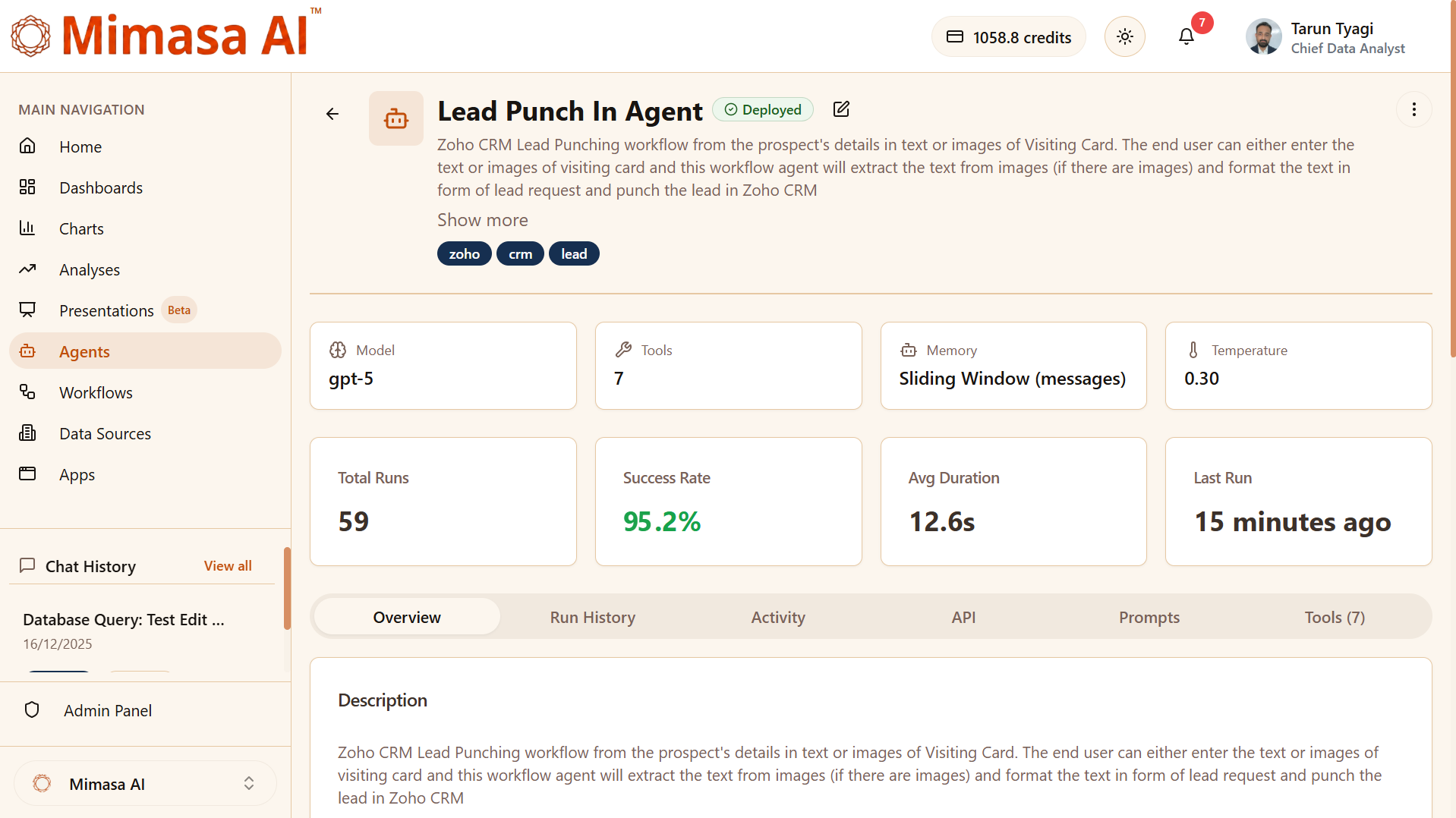
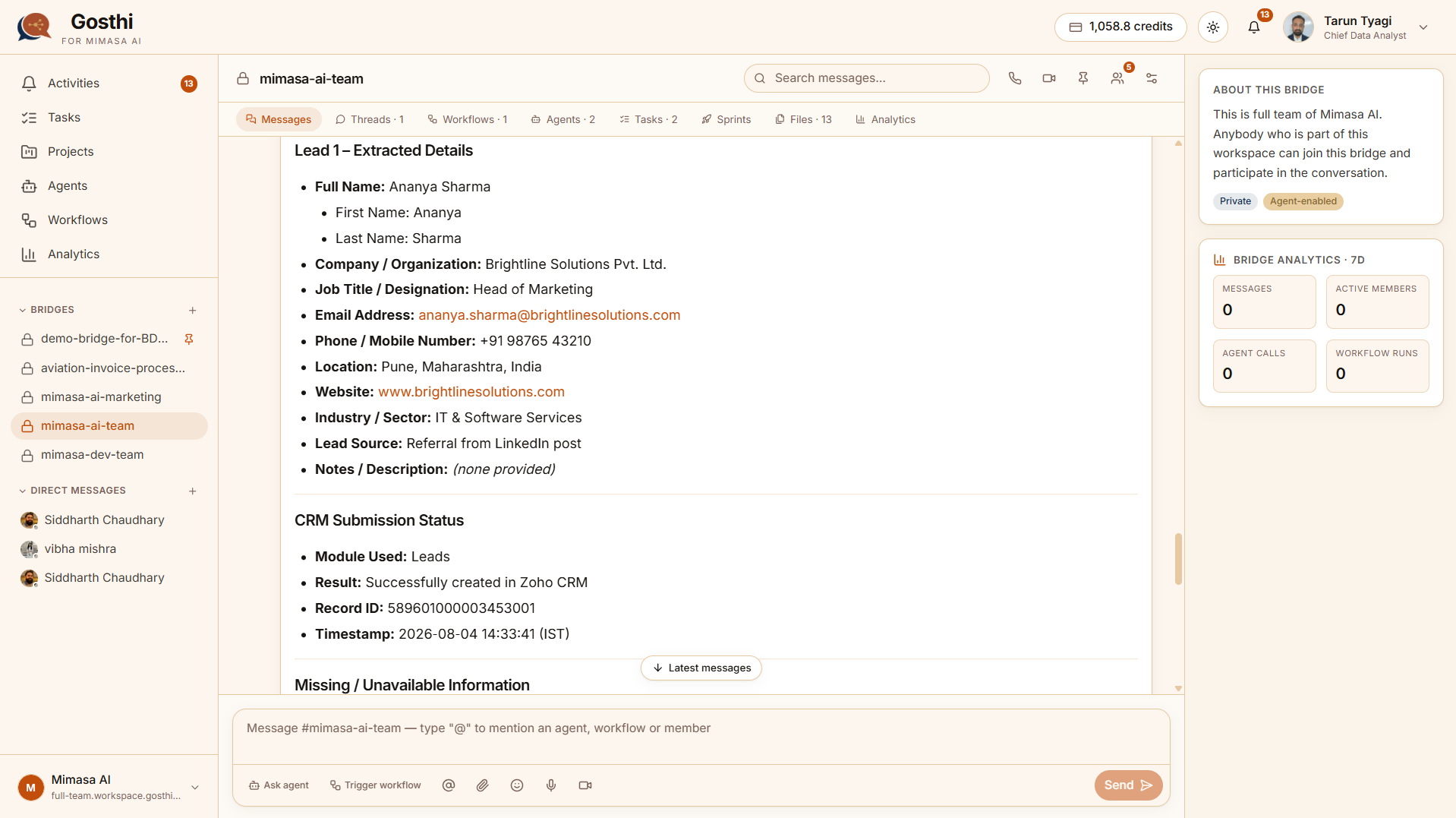
Inside Gosthi, a salesperson can speak privately to the agent or invoke it in an authorised sales Bridge.
This connects AI lead capture with team coordination and the next task.
Explore Gosthi By Mimasa AI →The CRM fields may change by industry. The capture pattern stays consistent.
| Industry Context | Example Information The Agent Can Structure |
|---|---|
| Manufacturing And Distribution | Product, specification, quantity, plant, delivery date, and buyer role |
| Banking And Financial Services | Customer interest, service need, branch or relationship owner, and follow-up status |
| Logistics | Route, shipment type, origin, destination, volume, and service timeline |
| Education | Programme interest, intake, location, applicant details, and counsellor follow-up |
| Travel And Hospitality | Destination, dates, group size, budget, and booking preference |
| Real Estate | Property type, location, budget, timeline, and assigned adviser |
| Professional Services | Service need, organisation, stakeholders, urgency, and next discussion |
Each organisation defines approved fields, validation rules, CRM actions, and review points.
Record the lead directly after a meeting, visit, or event.
Structure information and prepare permitted record actions without copying every field.
Request missing information before the next sales step.
Give managers a more current view of approved leads and ownership.
Carry requirements, timeline, budget, and meeting notes into the next task.
Use text, voice, or an image instead of waiting for desktop entry.
Results depend on input quality, CRM design, configured tools, business rules, and user adoption.
The organisation decides who can invoke the agent, what it can read, which fields it can change, and when approval is required.
Mimasa helps apply these controls. It does not make a CRM process secure or compliant by itself.
Move from manual entry to controlled lead intake automation without forcing a sales-system replacement.
Start with meetings, cards, voice notes, or trade shows.
Separate required fields from optional context.
Use the approved MCP tool, API, or Mimasa block.
Cover missing data, duplicates, formats, and uncertain extraction.
Decide when the agent can act and when a person must review.
Include poor images, partial notes, duplicates, and CRM errors.
Track capture time, completion, exceptions, follow-up creation, and adoption.
Add teams, inputs, or CRM actions after the first workflow is reliable.
Mimasa connects capture to the sales process. It does not replace specialist systems.
| Existing Capability | Its Role | Mimasa AI Role |
|---|---|---|
| CRM | Stores lead, contact, account, opportunity, and activity records | Captures, structures, and sends approved data through configured tools |
| Event Or Badge System | Collects attendee and badge information | Adds conversation context and starts the CRM workflow |
| Mobile Device | Captures text, voice, and card images | Provides an easy field-sales input point |
| Agent Builder | Defines instructions, tools, model, and limits | Creates the Lead Punch In Agent for the organisation's process |
| Agentic Workflow Automation | Coordinates rules, validation, approvals, and follow-up | Adds predictable steps around the agent's reasoning |
| Gosthi | Brings people, conversations, tasks, agents, and workflows together | Lets teams capture leads and coordinate the next action |
| Data Extraction | Reads visible information from an uploaded card | Converts unstructured content into fields for validation |
Clear answers about lead capture software, CRM connections, business-card images, voice input, permissions, and human review.
Give sales teams a faster way to turn meetings, voice notes, and business cards into structured CRM leads.
Bring one lead source, field map, or current CRM entry process to the discovery session.