
Workflow Automation Software Built for Intelligent Execution
Build automated workflows that connect your systems, understand business data, decide with context and act. One workflow automation platform with a visual builder, 450+ LLMs, enterprise integrations, MCP tools and human approval controls.
Automate More Than Repetitive Tasks
Rules-only automation assumes every input looks the same. Real operations are messier: documents arrive in different formats, requests need interpretation, and one decision depends on data spread across a CRM, ERP, spreadsheet and inbox.
Mimasa brings AI for workflow automation into the process itself, so a workflow can read unstructured information, classify it and support a decision before acting. See it in practice in our guide to revolutionising workflows with agentic AI.
How Automated Workflows Run
- 1
Trigger — A schedule, record change, webhook, file, form or message starts the run.
- 2
Connect — The workflow pulls what it needs from CRM, ERP, databases, storage and APIs.
- 3
Understand — AI blocks extract, classify, summarise or analyse structured and unstructured input.
- 4
Decide — Rules, thresholds and AI output choose the path — including agent calls.
- 5
Approve — Sensitive cases pause for human review with context already prepared.
- 6
Act — Records update, documents generate, messages send, downstream work begins.
- 7
Monitor — Execution logs show status, duration, errors, model usage and cost per node.
Build With the Right Automation Blocks
Mimasa is a no code workflow automation platform. Each block owns one responsibility, which keeps automated workflow solutions easy to build, test and improve.
Data and Connectivity
Retrieve files, records, messages and application data from the systems you already run, so the workflow works with live enterprise information instead of a copy.
Transformation
Clean, map, merge, filter and reshape data so every downstream application receives exactly the fields and formats it expects.
AI and LLM
450+ LLMs for extraction, classification, summarisation, analysis, generation and reasoning, chosen per step for accuracy, speed or cost.
Logic and Routing
Conditions, thresholds and business rules decide how the process continues, so a high-value case and a routine one follow different paths.
Agent
Call a purpose-built AI agent when a stage needs autonomous, tool-using work that cannot be reduced to a single model operation.
Human Approval
Route exceptions to authorised users before the workflow commits an action, with the supporting context already gathered for the reviewer.
Action
Update records, send communications, generate documents, call APIs, store outputs and start the next process or workflow.
Observability
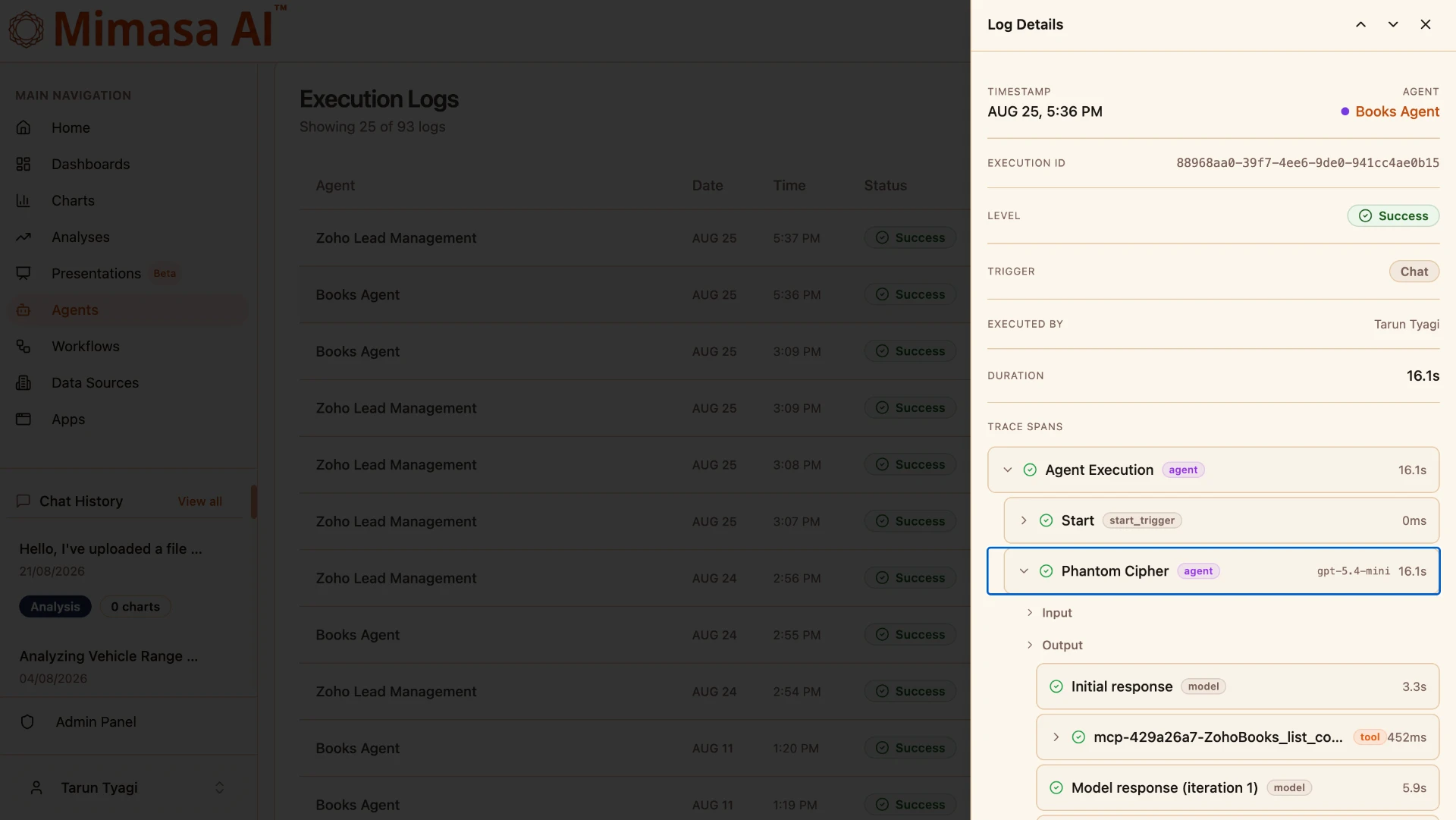
Every run is traced end to end with step-level inputs, outputs, duration, model usage and the credits each node consumed.
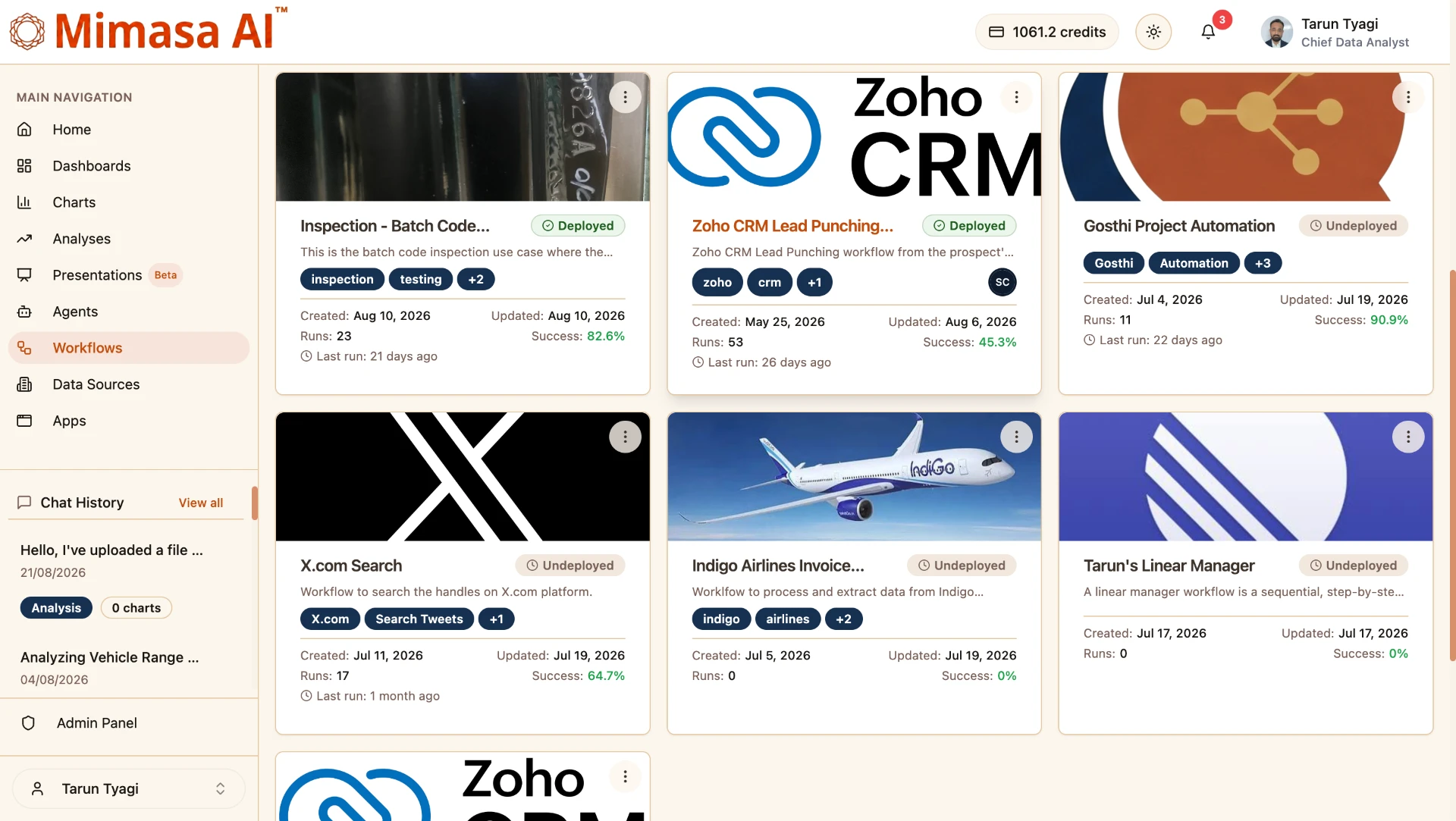
Manage and Monitor Every Workflow Automation
Draft and deployed states, central search, test runs before deployment, run history, failed-step detail, duration and credit tracking sit in one console — so a growing set of workflow automations never becomes a black box.
Step-level traces show the exact input and output of each node, which makes improving an automated workflow an evidence-based exercise rather than guesswork.
Know What Every Execution Costs
Mimasa applies no markup on model cost. Bring your own provider key or use ours — the economics are identical, so the choice stays an operational and data-residency decision.
Each execution log breaks credits down by node: which step used which model, how long it ran and what it cost. Combine that with transparent platform pricing to forecast a process scaling from ten runs a month to ten thousand.
Enterprise Workflow Automation Across Departments
These are enterprise workflow automation patterns that connect information, decisions, people and systems. Explore more automation use cases, including invoice processing.
Finance
Invoice intake and extraction, accounts payable routing, reconciliation, exception handling and payment approval coordination.
Sales and CRM
Lead intake and enrichment, qualification scoring, opportunity routing, proposal generation and pipeline alerts.
Customer Service
Request classification, customer data retrieval, response drafting, case updates and SLA-driven escalation.
Manufacturing
Inspection-data processing, inventory and production alerts, quality exception management and operational reporting.
Human Resources
Candidate and employee document processing, onboarding coordination, policy requests and leave approvals.
IT and Compliance
Access request routing, incident classification, evidence collection, policy checks and audit-ready reporting.
Supply Chain
Supplier and purchase coordination, delivery exception handling, stock checks and operational alerting.
Data and Reporting
Scheduled collection, cleaning and transformation, recurring analysis, dashboard refreshes and anomaly alerts.
Workflows and Agents: Two Ways to Automate
A workflow defines the operational path; an agent decides its own route to a goal. They complement each other — an automated workflow can call an AI Agent Builder agent, and an agent can start a controlled agentic workflow automation process when a repeatable path must be followed.
| Workflow Builder | Agent Builder |
|---|---|
| Orchestrates an end-to-end business process | Creates a goal-driven autonomous agent |
| Built from connected blocks, triggers and paths | Built from instructions, skills, memory and tools |
| The builder defines the process structure | The agent determines its next action |
| Best when the process must be repeatable | Best when the goal is clear but the route may vary |
Mimasa AI vs Traditional Automated Workflow Software
Mimasa pairs the reliability of process orchestration with the adaptability of agentic AI workflow automation, so one workflow automation tool runs both rigid compliance processes and judgement-heavy exception handling.
| Traditional Workflow Software | Mimasa AI Workflow Builder |
|---|---|
| Moves data through fixed steps | Combines process logic with AI understanding |
| Struggles with unstructured inputs | Interprets documents, messages and context |
| AI is external or added later | AI reasoning runs inside the workflow |
| One model or limited AI choice | Choice across 450+ LLMs, plus your own key |
| Executes tasks | Coordinates understanding, decisions and actions |
Why Teams Choose Mimasa to Automate Workflows
Visual, No-Code Design
Assemble and change enterprise workflow automation through modular blocks, so process owners can adjust the flow without an engineering cycle.
AI Inside the Process
Models and agents handle interpretation, reasoning and adaptive decisions at the exact stage where context matters most.
Enterprise Connectivity
Applications, databases, documents, APIs and MCP services join a single automation workflow that runs where the work already happens.
Human-in-the-Loop
Automate the routine and keep review, correction and approval wherever judgement, risk or accountability is involved.
Observable Execution
Run status, failures, duration, model usage and step-level activity stay visible for every workflow you deploy.
Workflows and Agents
Two automation patterns in one platform, so a repeatable process and an open-ended goal each get the right approach.
Transparent Cost
Credits reported per node with no markup on model cost, whether you bring your own provider key or use ours.
Deployment Choice
Cloud, private cloud or on-premise deployment to match data-residency, privacy and infrastructure requirements.
Built Around the Systems You Already Run
Mimasa works as an execution layer across ERP, CRM, accounting, storage, databases, communication tools and legacy services through integrations, APIs and MCP — not as a demand to replace them.
Cloud, private-cloud and on-premise deployment, plus model choice per workload, make it suitable for enterprise workflow automation software programmes that must balance delivery speed with operational control.
Start with one measurable process: define its trigger, inputs, decisions, exceptions and final actions, then turn that operating knowledge into an automated workflow system.
Governance and Control
- Role-based access to automation capabilities
- Human approval and escalation paths
- Controlled credentials and environment settings
- Defined tool access for every workflow
- Execution history and audit visibility
Frequently Asked Questions
Common questions about workflow automation software, AI blocks, cost and enterprise controls.
Turn Business Processes Into Intelligent Execution
Build automated workflows that connect data, decisions, people and enterprise systems — from the first trigger to the final action.