

What Is Sales Follow-Up Software, And What Should It Do?
Sales follow-up software helps a sales team decide who to contact, remember what was said, and send the next message on time. The best sales follow-up software goes one step further. It tells you why each lead is due today and drafts the message from the real conversation.
Illustrative scenario: a CRM reminder says “Call Ramya”. Her delivery request sits on WhatsApp, and her team review ended yesterday. Unless those details are connected, the rep must rebuild the story before writing.
This guide helps you choose without the usual vendor noise. It covers the kinds of tools on the market, what separates a useful tool from a busy one, and which kind suits which team.
Most sales teams need more than one. The question is which job is costing you deals today.
What Kinds Of Sales Follow-Up Software Are There?
Sales follow-up software comes in a few kinds: CRM reminders, sequence tools, inbox assistants and AI follow-up agents. Each solves a different part of the problem. Knowing which part hurts most makes the choice easier.
01
Crm Reminders And Tasks
Your CRM can set a task such as “Follow up with Rohan on Friday”. CRM follow up reminders may already be available in your stack.
- Good at
- keeping a date on record and showing a rep's open tasks.
- Falls short
- a basic reminder may carry little context. Reps still need to find why the lead is due and what to say.
- Best for
- small teams with few leads and short sales cycles.
02
Sequence And Cadence Tools
These send a planned series of emails at set gaps. Sales cadence automation and follow up email automation work well when the message can be the same for many people.
- Good at
- cold outreach at volume, consistent timing, basic open and reply tracking.
- Falls short
- the message follows a template, not the conversation. A buyer who already answered on WhatsApp can still get step three.
- Best for
- top-of-funnel prospecting where leads share one story.
03
Inbox Assistants And Email Writers
Email follow up software of this kind lives next to your inbox. An AI follow up email generator turns a few lines into a polished reply.
- Good at
- helping a rep produce a first draft faster.
- Falls short
- it sees one thread. It does not know the call note, the WhatsApp message or the quote you promised, and it does not tell you who is due.
- Best for
- reps who already know who to follow up and need help phrasing it.
04
Ai Follow-Up Agents
An AI follow-up agent connects to your CRM, email and chats. It builds the context for every lead, works out who is due, drafts the follow-up and waits for your approval. It is automated sales follow up with a person still in charge. Our guide to the AI sales assistant explains how that decision loop works.
- Good at
- context across channels, a daily list with reasons, drafts based on what the buyer actually said, pausing when a lead replies.
- Falls short
- it needs your channels connected and a clear review process, and it adds a step you must set up.
- Best for
- teams with long, multi-channel sales cycles, where one forgotten promise costs a deal.
These categories overlap. Many AI sales tools combine two of them, so judge each product by what it does, not by what it calls itself.
How Do The Different Kinds Compare?
The kinds differ most on context. A reminder knows a date, a sequence knows a schedule, an inbox assistant knows one thread, and an agent aims to know the whole lead. The table shows what to expect from each. Treat it as a general guide, since individual products vary.
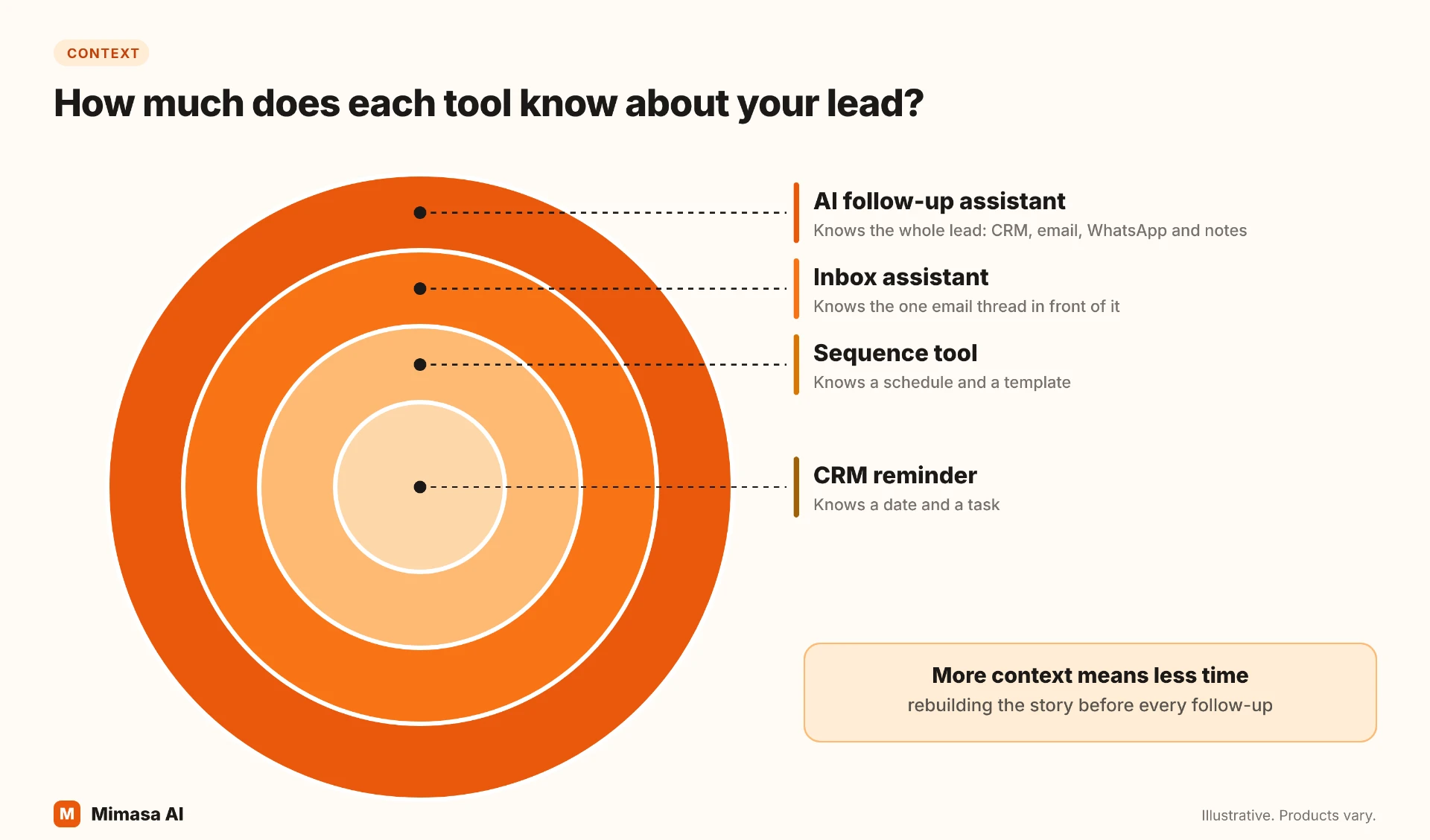
What it knows
CRM Reminders: A date and a task
Sequence Tools: A schedule and a template
Inbox Assistants: The email thread in front of it
AI Follow-Up Agents: CRM, email and chat history for each lead
Tells you who is due today
CRM Reminders: Yes, by date
Sequence Tools: By schedule
Inbox Assistants: No
AI Follow-Up Agents: Yes, with the reason
Drafts the message
CRM Reminders: No
Sequence Tools: From a template
Inbox Assistants: Yes, from your prompt
AI Follow-Up Agents: Yes, from the lead's conversation
Pauses when the lead replies
CRM Reminders: Manual
Sequence Tools: Usually on email replies
Inbox Assistants: Manual
AI Follow-Up Agents: Check connected-channel reply handling
Cold and sales follow-ups
CRM Reminders: Both, manually
Sequence Tools: Mostly cold
Inbox Assistants: Both, manually
AI Follow-Up Agents: Verify cold-prospect coverage
Typical Setup
CRM Reminders: Depends on existing CRM
Sequence Tools: Depends on sequence and channels
Inbox Assistants: Depends on inbox connection
AI Follow-Up Agents: Connections and a review process
Read it this way: broader context can reduce the work of rebuilding the story. The trade-off is more setup and a clearer review process. Test both with your own leads.
Sequence tools can also include tasks and reply-based stops. Check the precise channels and rules supported by each product.
What Should You Look For In Sales Follow-Up Software?
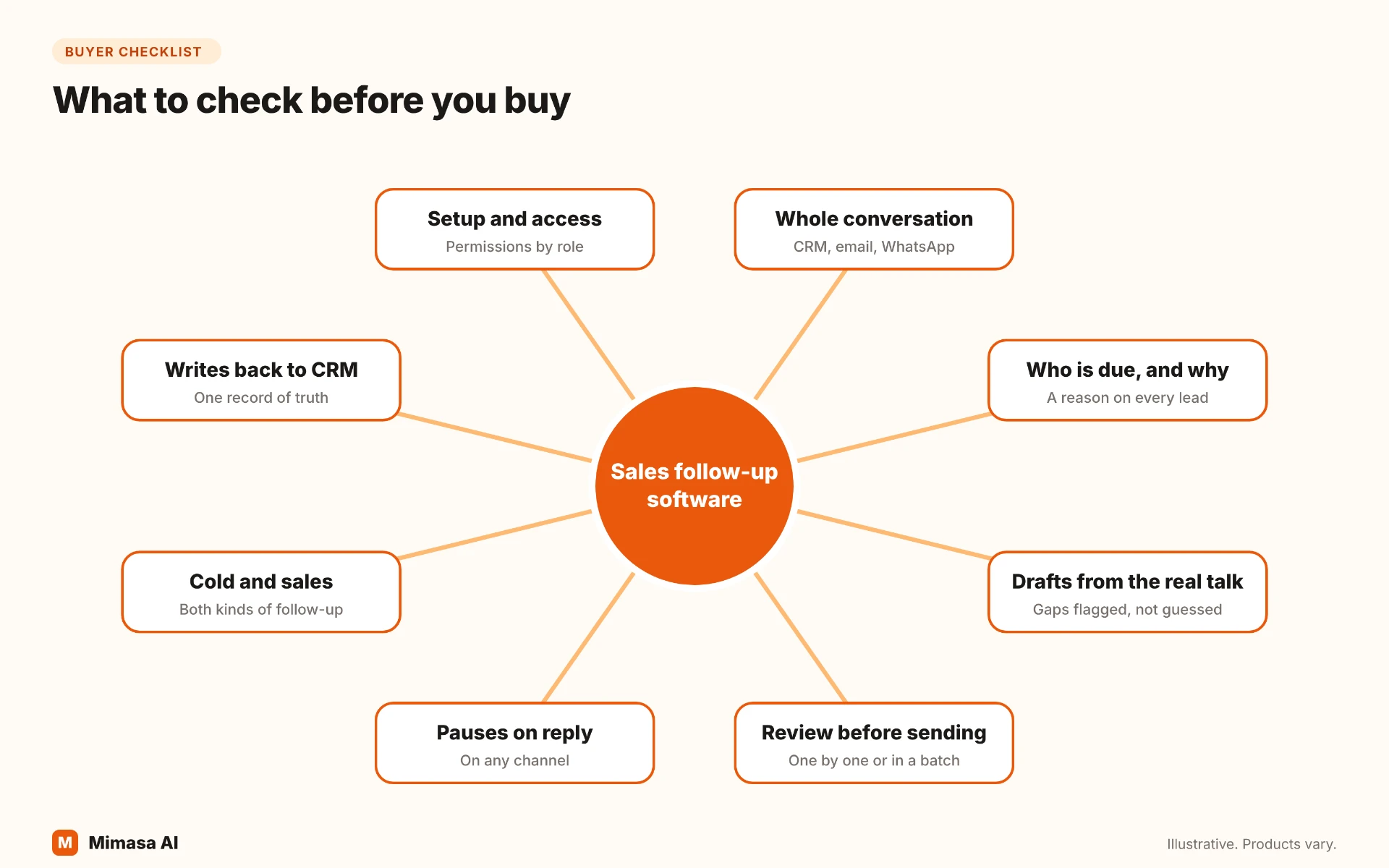
Look for these things: full context, a daily list with reasons, drafts from the real conversation, approval control, pause on reply, cold and sales coverage, CRM logging, and sensible access. Any lead follow up software worth buying should answer each one plainly.
1. Does it see the whole conversation?
A buyer may email on Monday, message on WhatsApp on Tuesday and tell a rep something on a call. If the tool sees only email, it works from half the story. For many B2B teams, WhatsApp follow up automation is not optional. Ask: which channels does it read, and can I see the source of each fact?
2. Does it say who is due, and why?
A list of names is a to-do list. A list with reasons (review date reached, quote owed, six days of silence) is a decision. Your sales follow up system should give you the second. Ask: what does the daily list show for each lead?
3. Are drafts written from what the buyer said?
A template with a first name merged in is not personal. A good draft refers to the actual question, promise or objection. Ask: what does the draft use as input, and does it flag what it can't confirm?
4. Can you review before it sends?
You should be able to edit one draft, approve a batch, or let selected leads run automatically. Prices, promises and negotiation stay with a person. Ask: what is the default, and who can change it?
5. Does it stop when a lead replies?
Nothing hurts trust like a scheduled "just checking in" arriving after the buyer already said yes. Ask: does a reply on any channel pause the pending message?
6. Does it cover cold and sales follow-ups?
Cold follow-ups turn prospects into leads. Sales follow-ups move existing leads to a decision. If you do both, one tool is easier than two. Ask: what happens when a cold prospect finally replies?
7. Does it write back to your CRM?
Your CRM should stay the system of record. The tool should log each send, so nobody follows up twice or loses the history. Ask: what is written back, and when?
8. How much setup does it need, and who can see what?
Check connection effort, permissions by role, and where data is processed. Do this before the demo impresses you. Ask: how long to a working list, and how are access and data handled?
Score each product from 0 to 2 on each of these. Weak scores on the first three usually mean your team will still do the hard part by hand.
Use 0 for absent, 1 for partial and 2 for demonstrated on your own leads. This is a trial rubric, not a vendor rating.
Which Type Of Sales Follow-Up Software Fits Your Team?
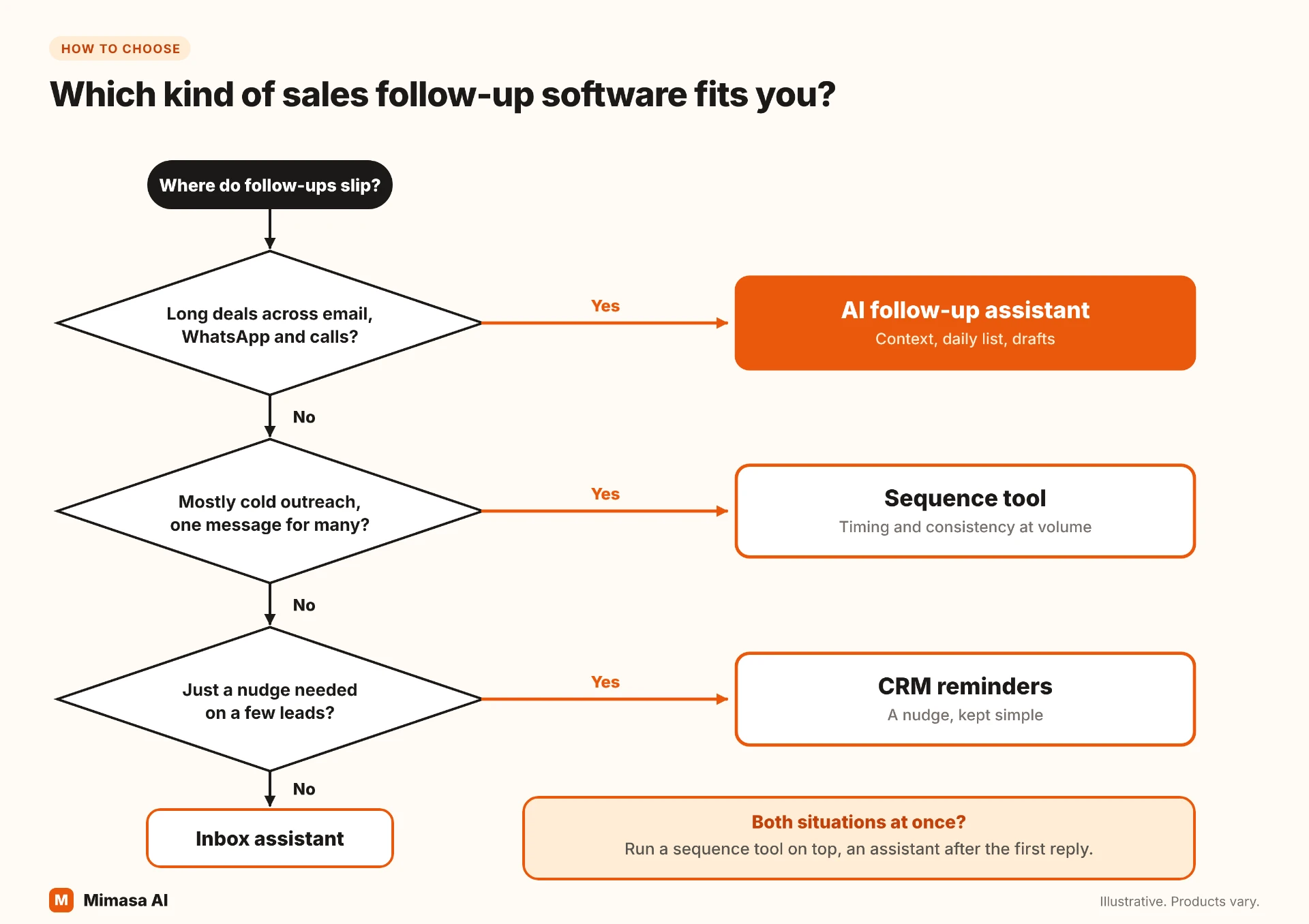
The right type depends on how many leads you handle, how long your sales cycle runs and where your conversations happen. Longer cycles and more channels push you toward an AI follow-up agent. Shorter cycles and one channel keep simpler tools enough.
Few leads, short sales cycle, one channel
Start With: CRM reminders, plus an inbox assistant if writing is slow
Why: The story is small enough for one person to hold
High-volume cold outreach with one message for many
Start With: A sequence tool
Why: Timing and consistency matter more than personal context
Long B2B cycles: proposals, quotes, several stakeholders
Start With: An AI follow-up agent
Why: Deals depend on remembering promises and review dates
Conversations split across email, WhatsApp and calls
Start With: An AI follow-up agent
Why: Only a tool that reads every channel sees the full story
Cold outreach at volume and a long sales cycle after the reply
Start With: A sequence tool for the top, an agent after the first reply
Why: Each tool does the job it is built for
Industries such as manufacturing, logistics and industrial services often fall into the long-cycle and multi-channel rows. The buyer reviews internally, asks for a revised quote, replies on WhatsApp and goes quiet for a week. Our guide to building a lead follow-up system shows the rules and daily routine to put around whichever tool you pick.
You do not have to replace what you own. An agent adds context and drafting around your CRM, and the CRM stays the record.
What Mistakes Do Teams Make When Buying Sales Follow-Up Software?
The most common mistake is judging a tool on a polished demo instead of your own messy leads. Several others follow it.
- 1.
Buying the demo
Demo data is clean. Test with real leads, including the one whose story sits in three places.
- 2.
Counting emails sent
Volume is easy to measure and easy to inflate. Count follow-ups completed on time, and the replies they earn.
- 3.
Switching on auto-send first
Start with review on every draft. Widen automation only for leads where you trust the result.
- 4.
Ignoring WhatsApp and calls
If the tool can't see them, it will suggest follow-ups that are already out of date.
- 5.
Replacing the CRM
A follow-up tool should sit around your CRM, not compete with it. Keep one record of truth.
- 6.
Skipping the baseline
Without today's numbers, you can't tell whether the tool helped.
A Two-Week Trial Plan
- 1.Pick one team or one lead segment, not the whole company
- 2.Record the baseline: due follow-ups done on time, and minutes spent finding context per lead
- 3.Run the tool with review on every draft
- 4.Track drafts approved as written, edited and skipped
- 5.Track follow-ups paused because the lead replied
- 6.Compare with the baseline, then decide how much to automate
The same measures appear in our guide to the lead follow-up system, so the trial doubles as the start of your routine.
Where Does Mimasa AI’s Lead Follow-Up Agent Fit?
Mimasa AI's Lead Follow-Up agent is an AI follow-up agent, the last kind above. It works inside a Gosthi bridge, connects to your CRM, email and WhatsApp, and keeps the context of every lead in one place.
At the time you choose, it posts the leads that need you, with each lead's status and the reason it is due. You can ask it what was said, what to send and what the next step is. It drafts the email from the real conversation and flags anything it can't confirm, such as a rate or a date. You edit a draft and send it, or approve a batch. If a lead replies first, it pauses the message and updates the context.
History, reply checks and CRM updates depend on configured connections and permissions. Keep call notes recorded in an approved source. Confirm the exact workflow in a demo.
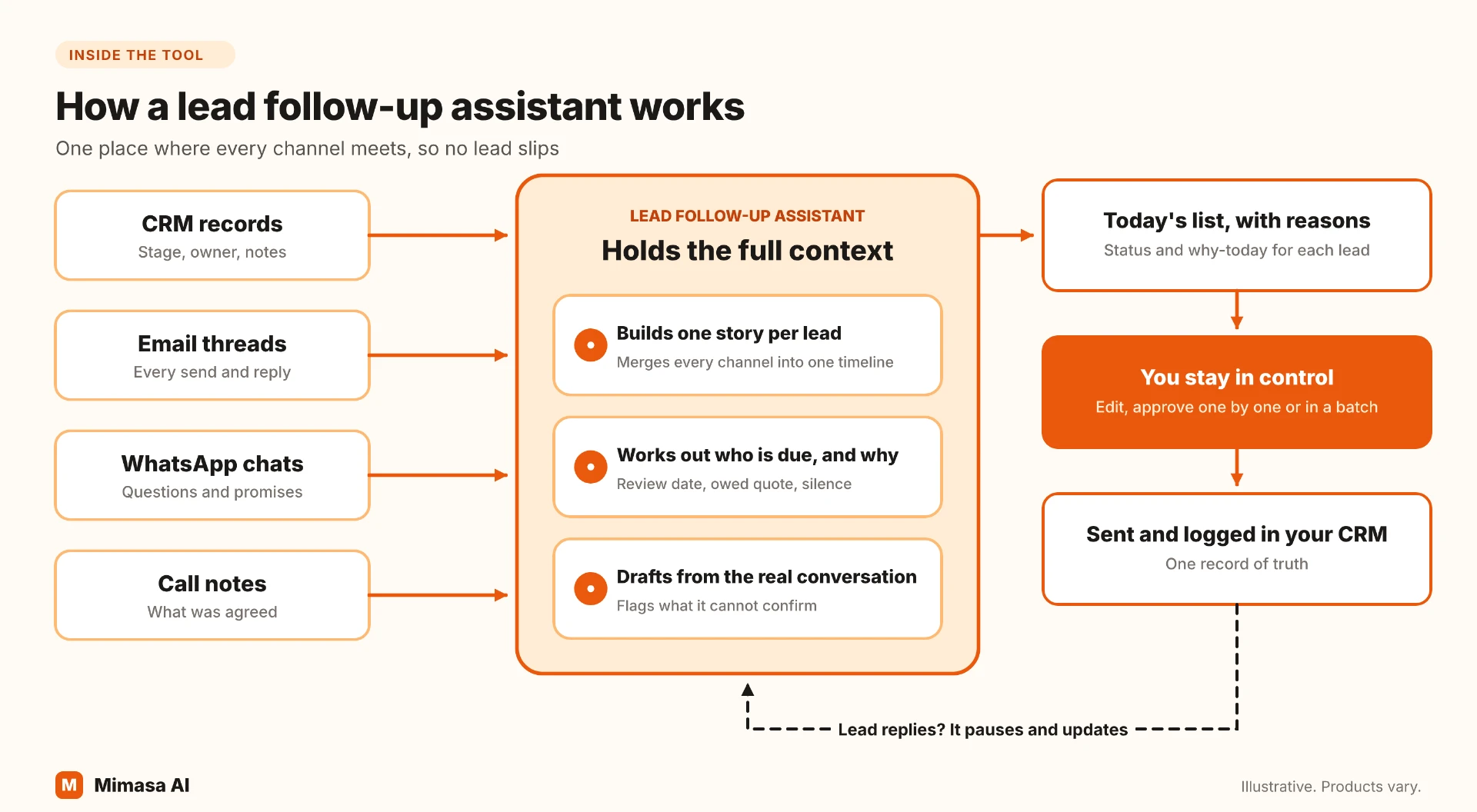
Here is how it handles these checks. Confirm cold-prospect coverage for your own process in a demo.
Whole conversation
How The Agent Handles It: Reads connected CRM, email and WhatsApp history, with a source for each point
Who is due, and why
How The Agent Handles It: A scheduled list showing status and reason for each lead
Drafts from the real conversation
How The Agent Handles It: Yes, with gaps flagged rather than guessed
Review before sending
How The Agent Handles It: Individual review or batch approval
Pause on reply
How The Agent Handles It: Pauses and updates context when the lead replies
CRM logging
How The Agent Handles It: Follow-up activity recorded against the lead
Setup and access
How The Agent Handles It: Connected to your CRM and channels; access follows assigned permissions
What it isn't: Mimasa AI is not a CRM, a lead database or a bulk cold-email sender. Your CRM stays the system of record, and the agent works with leads you already have. If all you need is a timed email sequence to many cold prospects, a sequence tool is simpler.
See the Lead Follow-Up Automation page for the full workflow, or read how the same ideas apply across the wider sales automation process.
For the writing itself, see how to write a follow-up email after no response. Use sales automation tools to make the next useful action easier, not simply to send more messages.