
Build AI Agents That Get the Task Done
Create custom AI agents that understand a goal, decide what needs to happen, use the right tools and complete the task autonomously. Configure instructions, add skills and MCP tools, choose from 450+ LLMs, test and deploy from one agent builder.
From a customer service agent that resolves enquiries end to end to an email agent that manages conversations, follow-ups and system updates, Mimasa turns AI from a passive assistant into an active digital worker with a traceable record of everything it did.
AI That Acts, Not Just Answers
Most AI tools wait for a question, generate a response and stop. Real business work rarely ends with an answer: a lead must be checked, enriched, qualified and updated; an enquiry needs account data, a reply and a record of the interaction.
Mimasa agentic AI reasons about the task, determines the next action, calls an approved tool, evaluates the result and continues until the goal is complete — autonomous, goal-driven execution rather than a rigid sequence.
A Mimasa AI Agent Can
- Understand the objective and operating instructions
- Use business applications, APIs and connected data
- Select the right tool based on the situation
- Perform multi-step actions without a person directing every step
- Adapt its next action using the result of the previous one
- Retain relevant context through configured memory
- Return the completed result with a traceable execution record
Agentic Automation Is Different From Workflow Automation
An automated workflow follows a designed path from a trigger through connected blocks and actions. An AI agent starts with a goal and uses instructions, context and tools to decide how the task gets done.
Use agentic workflow automation when the path must be orchestrated, and the workflow builder alongside agents when the outcome is clear but the route requires reasoning.
| Workflow Automation | Agentic Automation |
|---|---|
| Follows a predefined process | Works toward a defined goal |
| Builder specifies the sequence | Agent decides the next action |
| Logic lives in blocks and branches | Intelligence lives in instructions, skills and tools |
| Best for repeatable processes | Best for interpretation and adaptive action |
| Exceptions need designed paths | Agent reassesses from tool results |
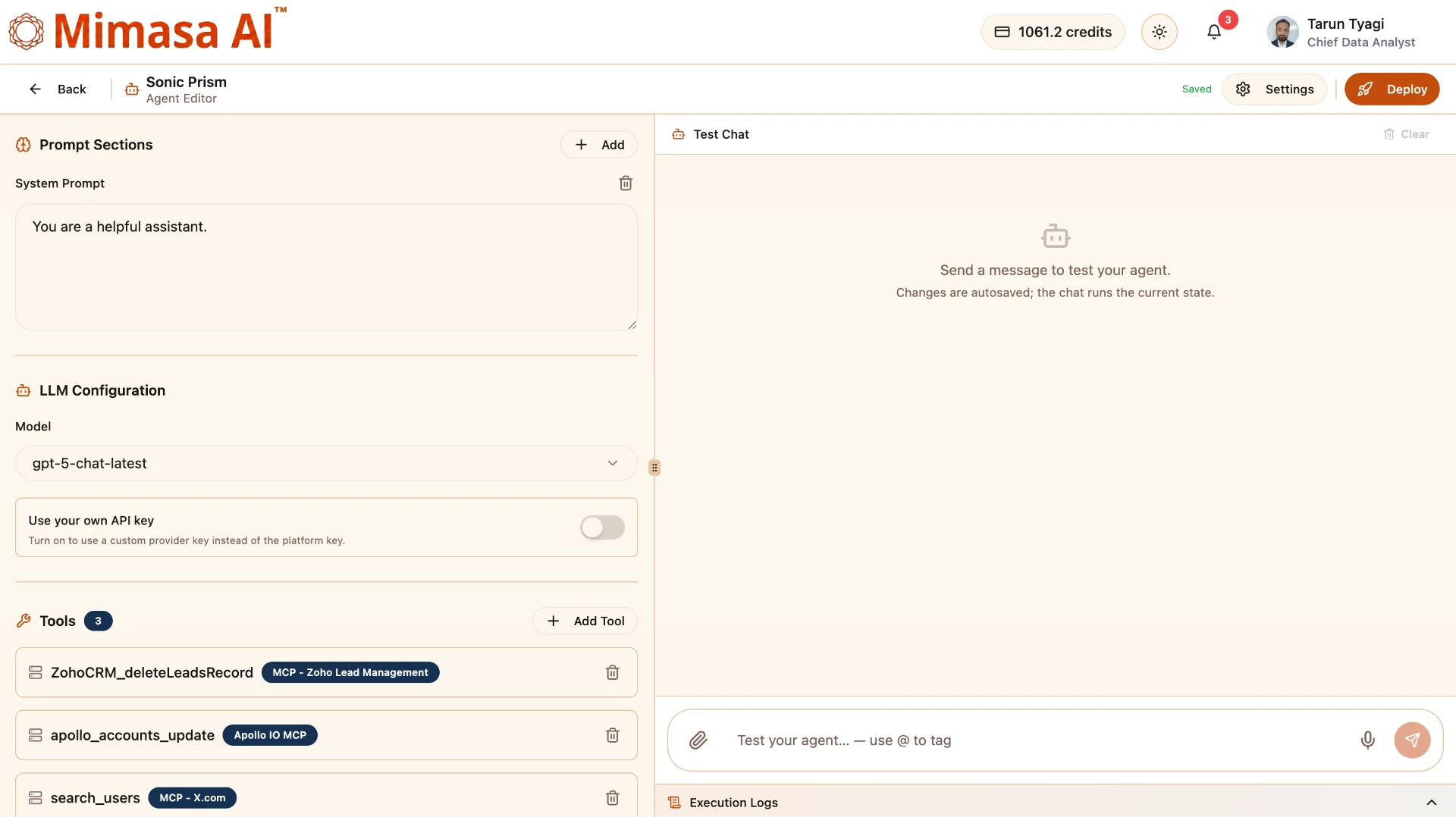
Build an Agent Around the Work You Need Done
The Mimasa agent builder brings intelligence, behaviour and the action layer into one place. You decide what the agent is responsible for, what it knows, which systems it can reach and what it is allowed to do.
The result is an agent designed for a specific business responsibility — not a generic chatbot with a new name.
Define the Role and Instructions
System, user and assistant prompt sections shape how the agent thinks, communicates and acts. Reusable sections keep policies, context and instructions separate and easy to manage.
Choose From 450+ LLMs
Match the model to reasoning quality, speed, cost, context capacity, language and deployment control — an advanced model for complex decisions, a smaller one for high volume. Use your own API key where required.
Give the Agent Tools
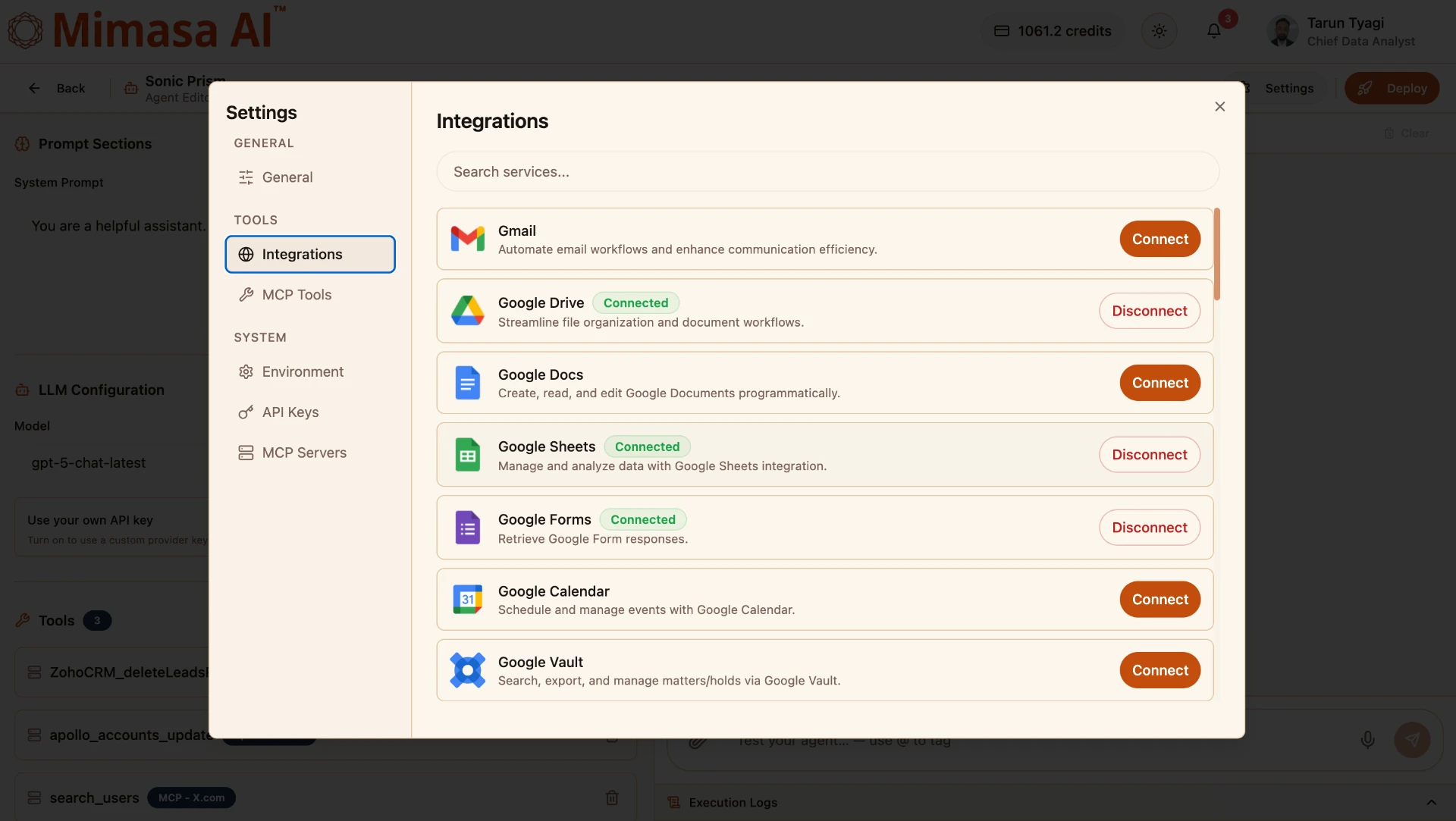
Connect email, storage, documents, spreadsheets, calendars, CRM, accounting and other enterprise applications. The agent inspects available tools and uses the relevant capability as the task evolves.
Extend With MCP
Add MCP tools and servers so the agent reaches internal services, data sources and specialised capabilities through a standard connection, available only to the agents that need them.
Add Skills and Domain Intelligence
Skills capture how a task should be performed: specialised instructions, repeatable methods, domain rules and supporting resources — your way of working, encoded.
Configure Memory and Environment
Choose how the agent retains context, and add environment settings, API credentials and MCP servers without embedding sensitive information inside prompts.
Test Before You Deploy
Use the built-in test chat to check responses and tool selection while configuring, refine the instructions, then deploy the agent to start handling its assigned tasks.
Manage at Scale
Organise draft and deployed agents, review their models, tools, tags and memory, track runs and success rate, and share agents across the organisation.
Tools Turn Intelligence Into Completed Work
Connect the enterprise services an agent needs, then let it select the relevant capability as the task evolves. Typical actions include:
- Reading and sending emails
- Finding, creating or updating CRM records
- Retrieving balances and accounting information
- Reading and editing documents or spreadsheets
- Searching connected knowledge and files
- Scheduling calendar events
- Calling internal or external APIs
- Updating a system after completing a decision
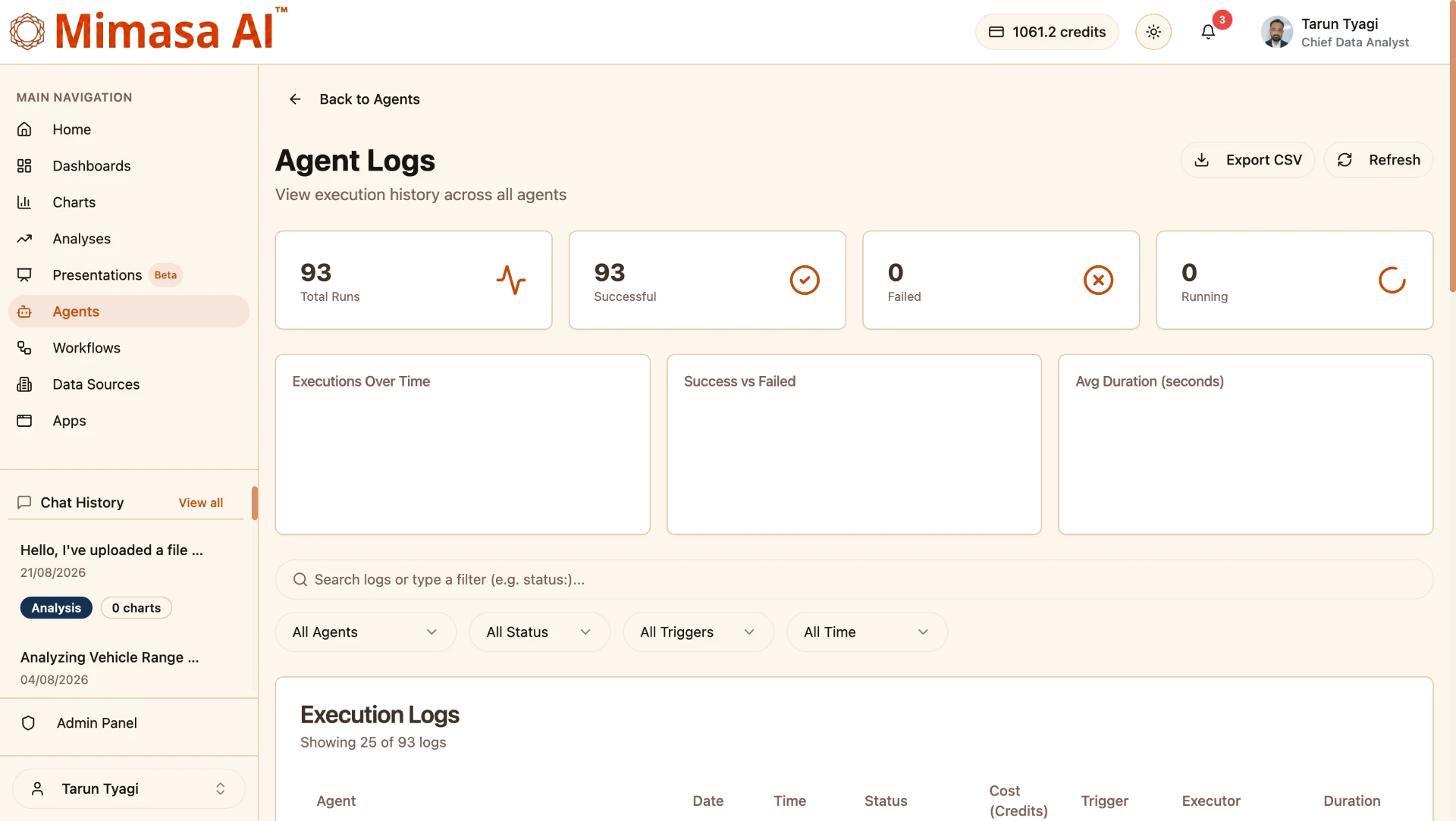
See What Every Agent Did
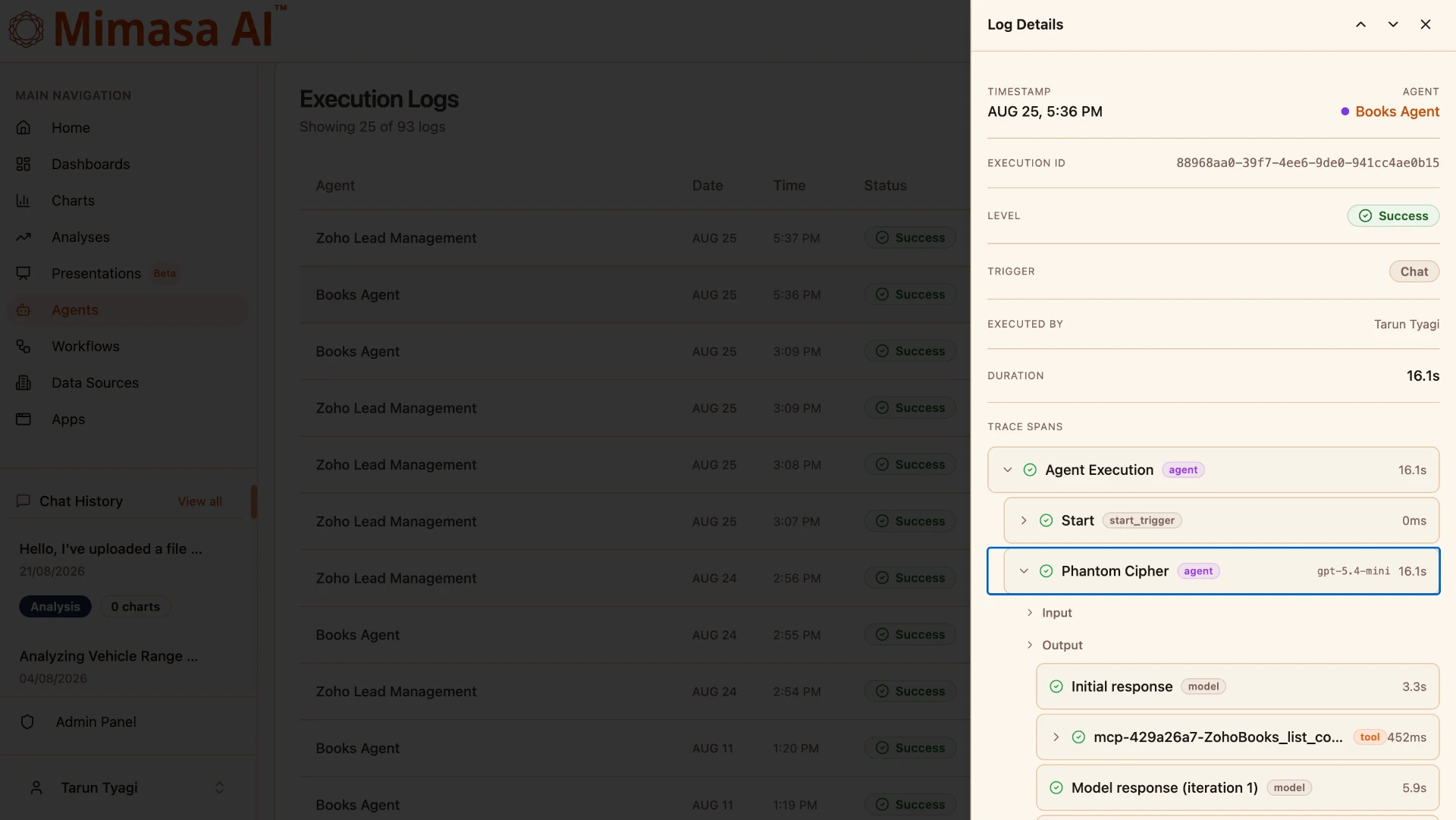
Autonomous execution should remain observable. Execution logs and step-level traces show how an agent moved from the initial request through model reasoning and tool use to its final response, so testing, optimisation, troubleshooting and operational oversight are part of the platform rather than an afterthought. Credits are reported per node with no markup on model cost, whether you bring your own provider key or use ours, which keeps the economics of an agent predictable as volume grows.
- Total, successful, failed and running executions
- Execution trends and average duration
- Agent, timestamp, status, trigger and executor
- AI credit usage and execution cost
- Step-level trace spans with inputs and outputs
- Model calls, tool calls and time per stage
Custom AI Agents for Real Business Roles
Build agents around actual responsibilities, from lead management to accounting support. Explore related automation use cases.
Customer Service Agent
Understands an enquiry, retrieves account or order information, resolves common requests, updates the service system and responds consistently across operating hours.
Email Agent
Monitors incoming messages, understands intent, prioritises requests, drafts or sends replies, records the interaction and starts the next required action.
Chatbot Agent
Moves beyond scripted answers: searches approved information, calls tools and completes actions inside the conversation, such as creating a request or updating a record.
WhatsApp Agent
Serves customers, partners and field teams on a familiar channel, retrieving information and performing permitted actions with full conversation context.
See the WhatsApp customer service use case →Sales and CRM Agent
Reviews leads, enriches account information, updates CRM records and identifies the next action across connected data sources.
Finance and Accounting Agent
Retrieves balances, reviews accounting records, answers operational finance questions and performs authorised updates through connected tools.
Research and Intelligence Agent
Investigates a question with approved search, data and document tools, analyses the evidence and returns a structured result.
Internal Knowledge Agent
Answers policy, process and system questions from approved internal sources, then completes the follow-up action the request implies.
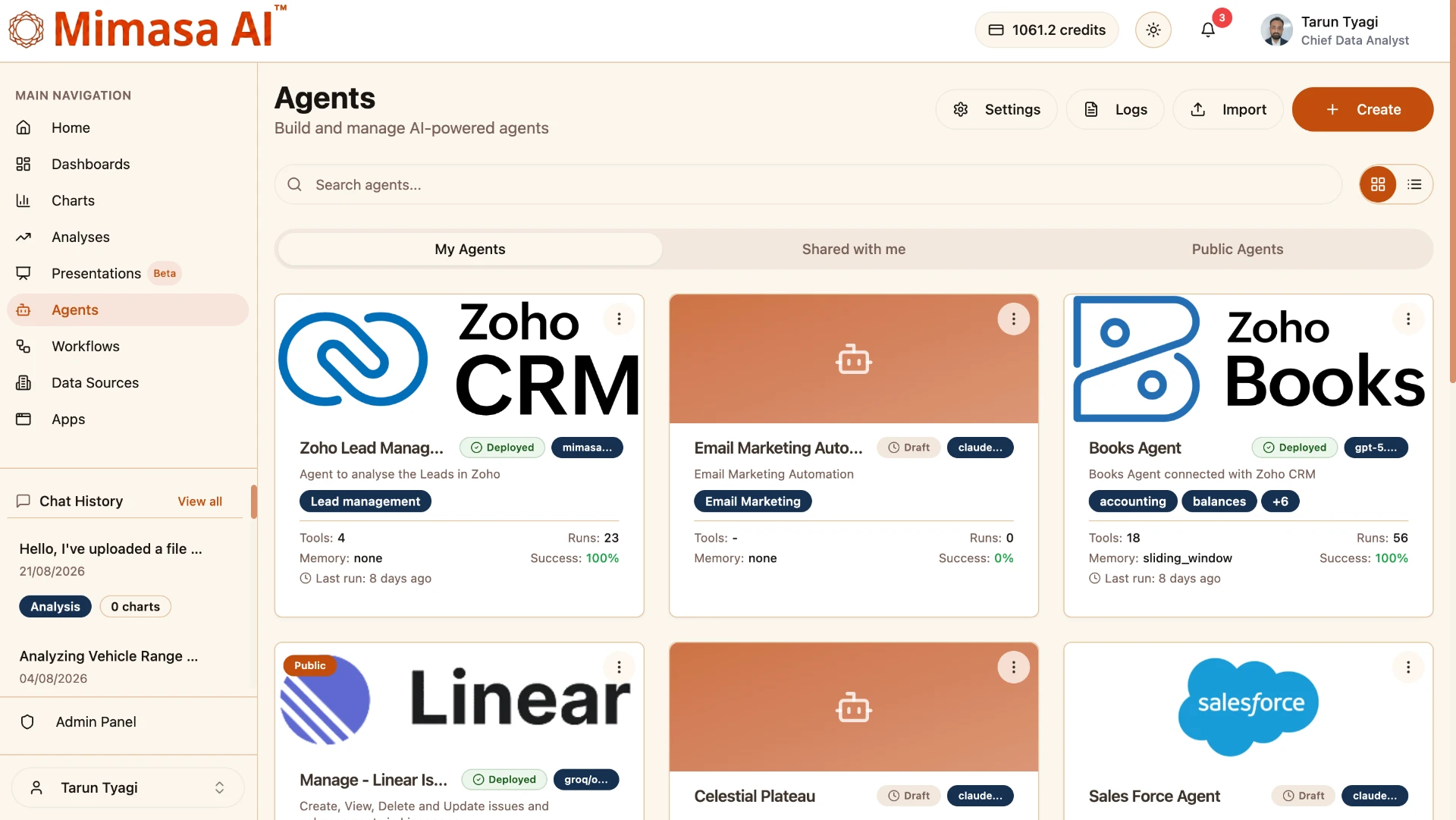
From One Agent to an Enterprise Agent Workforce
A central place to build, organise and manage AI agents across teams: your agents, shared agents and public agents, with draft and deployed status, selected model, tools, tags, memory, run counts and success rate all visible.
Enterprise agentic automation needs more than a strong model. The objective is accountable autonomy — work completed independently while remaining configured, observable and manageable. Review transparent pricing before you scale.
Why Build AI Agents With Mimasa
One Builder for Intelligence and Action
Configure prompts, models, skills, tools, memory and environment without assembling a separate system for every layer.
Model Choice for Every Use Case
Choose from 450+ LLMs and match the model to the agent’s task, response time, cost and deployment requirements.
Tools That Connect Agents to Work
Turn an AI response into a completed action through business integrations, APIs and MCP tools.
Purpose-Built Custom AI Agents
Build agents around defined enterprise roles instead of forcing every team onto one general-purpose assistant.
Testable and Observable Execution
Test an agent while building it, then use centralised logs and detailed traces to understand production behaviour.
Manage Agents at Scale
Organise draft and deployed agents, review tools and models, track performance and share agents across teams.
Bounded Autonomy
Give each agent only the tools its role requires, with credentials and environment settings kept outside the prompt.
Deployment Choice
Cloud, private cloud or on-premise deployment to match data-residency, privacy and infrastructure requirements.
How an AI Agent Completes a Task
Unlike a fixed automation path, the sequence can change with the task and the information the agent receives. Every stage is recorded so the execution stays reviewable.
- Only the tools each role requires
- Credentials managed outside the prompt
- Model chosen for the task and the data
- Modular, reviewable configuration
- Central execution, cost and outcome monitoring
- 1
Receive the goal — A request arrives through chat or another connected interaction.
- 2
Understand the context — The agent applies its instructions, skills, memory and available information.
- 3
Plan the next action — The selected LLM determines what needs to happen from the current state.
- 4
Use the right tool — It calls an integration, API or MCP tool permitted in its configuration.
- 5
Evaluate the result — It interprets what the tool returned and decides whether more action is required.
- 6
Complete the task — The agent continues until the outcome is achieved and returns the result.
- 7
Record the execution — Logs capture status, duration, usage and step-level traces.
Frequently Asked Questions
Common questions about building, deploying and governing custom AI agents.
Give AI a Goal — and the Ability to Complete It
Build, test and deploy custom AI agents that understand requests, use enterprise tools and autonomously finish real tasks.